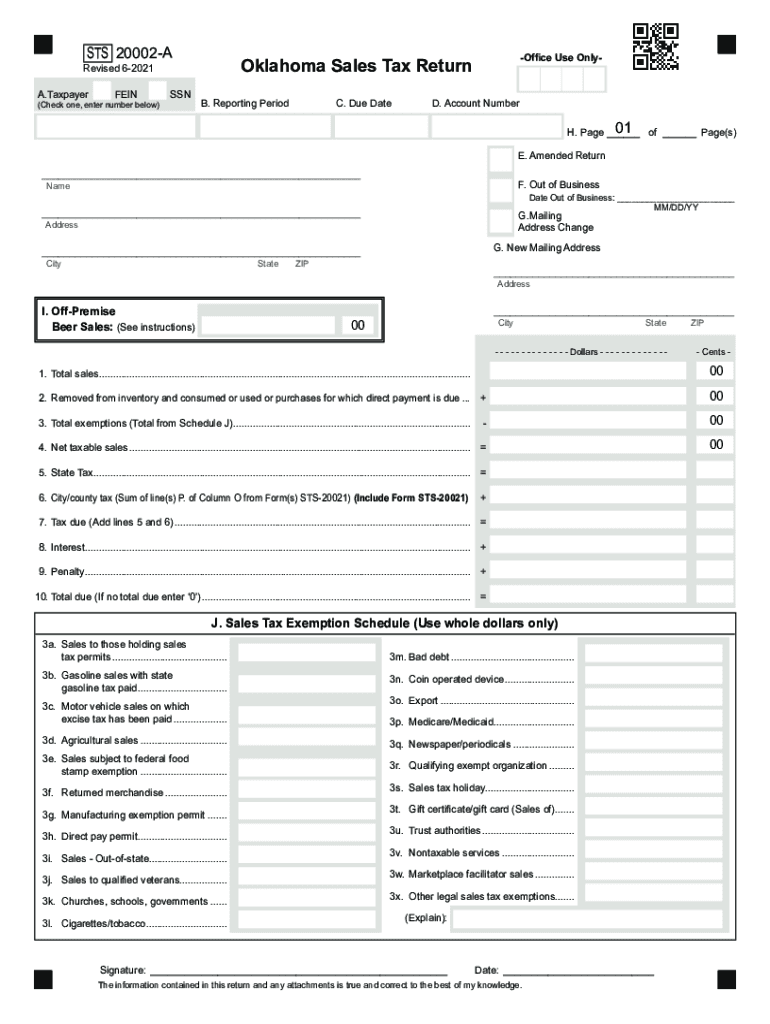
Oklahoma Tax Commission Form STS20002A Oklahoma Sales Tax Return for Filing Returns After July 1, 2017. This form is used to file Oklahoma sales tax returns AFTER July 1, 2017.STS 20002AA. TaxpayerFEIN(Check.
Loading

Open form follow the instructions

Easily sign the form with your finger

Send filled & signed form or save
How to fill out the OK STS-20002-A online
Filling out the OK STS-20002-A form online is an essential step for vendors responsible for collecting and remitting the Oklahoma sales tax. This guide will walk you through each section of the form, providing clear instructions to ensure accurate and timely submission.
Follow the steps to complete your sales tax return accurately.
- Click the ‘Get Form’ button to obtain the form and open it in your preferred online editor.
- In section A, identify the type of taxpayer identification number you are using. Check the appropriate box and enter your Federal Employer Identification Number (FEIN) or Social Security Number (SSN) as applicable.
- For section B, specify the reporting period by entering the month(s) and year for the sales you are reporting. Ensure you start with the month when you made your first sale.
- In section C, enter the due date for the return, which is the 20th day of the month following the reporting period.
- Input your account number in section D to link the return to your business registration.
- If applicable, check box E to indicate that this is an amended return. Be sure to include the reason for the amendment if necessary.
- If you are no longer in business, check box F and provide the date you ceased operations in the space provided.
- In section G, if your mailing address has changed, check the appropriate box and enter your new mailing address, including city, state, and ZIP code.
- Enter the total number of pages included with the return in section H.
- In section I, report any sales from off-premises beer sales as applicable. Note that this should only reflect sales for off-premises consumption.
- In lines 1 through 10, enter the respective amounts for total sales, tax exemptions, net taxable sales, state and local taxes, interest, and any penalties. Follow the calculations outlined in the form instructions.
- Finally, sign and date the form where indicated. Review all entries carefully to ensure accuracy.
- Once completed, save your changes, and proceed to download, print, or share the form as needed.
Complete your OK STS-20002-A form online today to stay compliant with Oklahoma sales tax regulations.
Experience a faster way to fill out and sign forms on the web. Access the most extensive library of templates available.
Related content
Returns must be filed for every period even though there is no amount subject to tax nor...
Use professional pre-built templates to fill in and sign documents online faster. Get access to thousands of forms.
If you believe that this page should be taken down, please follow our DMCA take down process here.