Loading
Form preview
  • US Legal Forms
  • Other Templates
  • Tax Forms
  • Executive Department Treasury IRS Forms
  • Irs 1040-ss 2022

Get Irs 1040-ss 2022

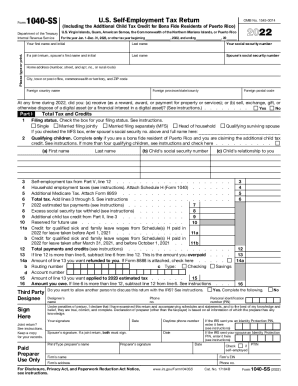
, Guam, American Samoa, the Commonwealth of the Northern Mariana Islands, or Puerto Rico Department of the Treasury For the year Jan. 1 Dec. 31, 2022, or other tax year beginning , 2022, and ending , 20 Internal Revenue Service Your first name and initial Last name Your social security number If a joint return, spouse s first name and initial Last name Spouse s social security number Home address (number, street, and apt. no., or rural route) City, town or post office, commonwealth o.

How it works

  1. Open form

    Open form follow the instructions

  2. Easily sign form

    Easily sign the form with your finger

  3. Share form

    Send filled & signed form or save

How to fill out the IRS 1040-SS online

The IRS 1040-SS is a crucial document for individuals self-employed in American territories such as Puerto Rico, Guam, and the U.S. Virgin Islands. This guide provides a step-by-step approach to successfully completing this form online.

Follow the steps to effectively fill out the IRS 1040-SS form online.

  1. Click ‘Get Form’ button to obtain the form and open it in the editor.
  2. Begin with entering your personal information. This includes your first and last name, and your social security number. If filing jointly, include your partner's name and social security number.
  3. Input your home address accurately, ensuring to include all relevant details such as number, street, city, and ZIP code.
  4. Indicate whether you received or disposed of any digital assets during the year by selecting ‘Yes’ or ‘No’. This is critical in determining your tax obligations.
  5. Select your filing status from the options provided, such as single, married filing jointly, or head of household, by checking the appropriate box.
  6. If claiming the additional child tax credit, provide the necessary details for each qualifying child, including their names, social security numbers, and relationship to you.
  7. Complete the tax and credits section by accurately calculating your self-employment tax, any household employment taxes, and additional Medicare tax. Add all relevant figures.
  8. Determine your total payments and credits, ensuring to input accurate estimates of tax payments made earlier in the year.
  9. If you have an overpayment, specify the amount you wish refunded or applied to your estimated tax for the following year.
  10. Sign and date the form upon completion. If filing jointly, your partner must also sign. If a paid preparer assisted you, they need to provide their information in the designated section.
  11. Once all information is accurately filled, you can choose to save your changes, download the completed form, print it, or share it as necessary.

Complete your IRS 1040-SS form online with ease by following these steps.

Get form

Experience a faster way to fill out and sign forms on the web. Access the most extensive library of templates available.

Related content

Instructions for Form 1040-SS (2018) | Internal...
Feb 4, 2019 - Maximum income subject to social security tax for 2018. Optional methods to...
Learn more
Identity Theft, Fraud & Scams | Internal Revenue...
Sep 13, 2019 - Learn how the IRS protects your information and steps you can take to...
Learn more
2004 Instructions For Form 1040 (ALL) P 72 I1040
Check out www.irs.gov and click on “1040 Central” for the tax forms, .... Attach...
Learn more

Related links form

Fra Forms Online 6180 55 Stress Corrosion Cracking Russell H Jones Pdf Form Administrative Ruling 119 Empty Sheet For Seieve Analysis

Questions & Answers

Get answers to your most pressing questions about US Legal Forms API.

Contact support

Yes, you can fold your return to put it in an envelope. When you mail a tax return, you need to attach any documents showing tax withheld, such as your W-2's or any 1099's. Use a mailing service that will track it, such as UPS or certified mail so you will know the IRS received the return.

You should, however, use an envelope which is approved for sending mail by the United States Postal Service. For small returns, a standard business-class envelope is usually acceptable.

However, Form 1098 will only be filed to report the interest payment made on the second home. The $550 interest made on the first home can still be filed using the form, but this is optional. Interest payments made by a trust, estate, corporation, or partnership do not need to filed.

Prior Year Tax Return Copies. ... Personal & Dependent Information. ... Income Statements. ... Itemized Deductions. ... Retirement & Education. ... Health Care (New for Tax Year 2014) ... Stocks & Mutual Funds. ... Self-Employment.

The filing instructions will say which copy of your W-2 to include, as well as the address to mail your return. Copy B of the W-2 is included with a mailed return. Assemble your tax return in the form order that it printed. If you efiled your return, then there should not be anything to mail in.

You can easily deposit a check that has other papers stapled to them. You need to claw off the staple carefully from the check to ensure it doesn't rip. If you happen to pull too hard, not only can you rip the check, you can also cause bodily harm to yourself and cause blood to spill over the check.

Please do not attach checks or other documents to your return with staples or paper clips. It will definitely slow down the processing of your return. Enclose them instead, when you send by mail. Receiving your refund as a direct deposit to your bank account is a good idea.

On forms like the W-2, the IRS explicitly tells you to avoid using staples to attach documents or checks ( Staple holes or tears interfere with machine reading. ) ... When we receive paperclips attached to paper returns, we simply re-use them, says an IRS representative.

Staple all your forms and schedules together in the upper left corner. Attach W-2 and 1099 income documents. You'll receive a few copies of each income document that's mailed to you. ... Only staple these forms to the first page of your 1040 do not allow your staple to go through all the forms in your return.

Though, if you're simply wondering if you can staple a tax return, the answer is sort of. According to the article, you can staple your W-2 and 1099 to the front of your 1040 (in the appropriate income section.) But, be sure it doesn't staple through the rest of the documents!

Get This Form Now!

Use professional pre-built templates to fill in and sign documents online faster. Get access to thousands of forms.
If you believe that this page should be taken down, please follow our DMCA take down processhere.
Get IRS 1040-SS
  • Adoption
  • Bankruptcy
  • Contractors
  • Divorce
  • Home Sales
  • Employment
  • Identity Theft
  • Incorporation
  • Landlord Tenant
  • Living Trust
  • Name Change
  • Personal Planning
  • Small Business
  • Wills & Estates
  • Packages A-Z
  • Affidavits
  • Bankruptcy
  • Bill of Sale
  • Corporate - LLC
  • Divorce
  • Employment
  • Identity Theft
  • Internet Technology
  • Landlord Tenant
  • Living Wills
  • Name Change
  • Power of Attorney
  • Real Estate
  • Small Estates
  • Wills
  • All Forms
  • Forms A-Z
  • Other Templates
  • Legal Hub
  • About Us
  • Help Portal
  • Legal Resources
  • Blog
  • Affiliates
  • Contact Us
  • Delete My Account
  • Site Map
  • Industries
  • Forms in Spanish
  • Localized Forms
  • State-specific Forms
  • Forms Kit
  • Real Estate Handbook
  • All Guides
  • Notarize
  • Incorporation services
  • For Consumers
  • For Small Business
  • For Attorneys
  • USLegal
  • FormsPass
  • pdfFiller
  • signNow
  • altaFlow
  • DocHub
  • Instapage
Form Packages
  • Adoption
  • Bankruptcy
  • Contractors
  • Divorce
  • Home Sales
  • Employment
  • Identity Theft
  • Incorporation
  • Landlord Tenant
  • Living Trust
  • Name Change
  • Personal Planning
  • Small Business
  • Wills & Estates
  • Packages A-Z
Form Categories
  • Affidavits
  • Bankruptcy
  • Bill of Sale
  • Corporate - LLC
  • Divorce
  • Employment
  • Identity Theft
  • Internet Technology
  • Landlord Tenant
  • Living Wills
  • Name Change
  • Power of Attorney
  • Real Estate
  • Small Estates
  • Wills
  • All Forms
  • Forms A-Z
  • Other Templates
Customer Service
  • Legal Hub
  • About Us
  • Help Portal
  • Legal Resources
  • Blog
  • Affiliates
  • Contact Us
  • Delete My Account
  • Site Map
  • Industries
  • Forms in Spanish
  • Localized Forms
  • State-specific Forms
  • Forms Kit
Legal Guides
  • Real Estate Handbook
  • All Guides
Prepared for you
  • Notarize
  • Incorporation services
Our Customers
  • For Consumers
  • For Small Business
  • For Attorneys
Our Sites
  • USLegal
  • FormsPass
  • pdfFiller
  • signNow
  • altaFlow
  • DocHub
  • Instapage
Social Media
Call us now toll free:
+1 833 426 79 33
As seen in:
© Copyright 1999-2026 airSlate Legal Forms, Inc. 17 Station Street, Suite 303, Brookline, MA 02445
  • Your Privacy Choices
  • Terms of Service
  • Privacy Notice
  • Content Takedown Policy
  • Bug Bounty Program
IRS 1040-SS
This form is available in several versions.
Select the version you need from the drop-down list below.
2024 IRS 1040-SS
Select form
  • 2024 IRS 1040-SS
  • 2023 IRS 1040-SS
  • 2022 IRS 1040-SS
  • 2021 IRS 1040-SS
  • 2020 IRS 1040-SS
  • 2019 IRS 1040-SS
  • 2018 IRS 1040-SS
  • 2017 IRS 1040-SS
  • 2016 IRS 1040-SS
  • 2015 IRS 1040-SS
  • 2014 IRS 1040-SS
  • 2013 IRS 1040-SS
  • 2012 IRS 1040-SS
  • 2011 IRS 1040-SS
  • 2010 IRS 1040-SS
Select form