Loading
Get Hi Dot N-884 2022
How it works
-

Open form follow the instructions
-

Easily sign the form with your finger
-

Send filled & signed form or save
How to fill out the HI DoT N-884 online
Filling out the HI DoT N-884 form online can seem daunting, but this guide will provide you with clear and detailed instructions to ease the process. By following these steps, you will be able to confidently submit your claim for the credit for employment of vocational rehabilitation referrals.
Follow the steps to successfully complete the HI DoT N-884 form.
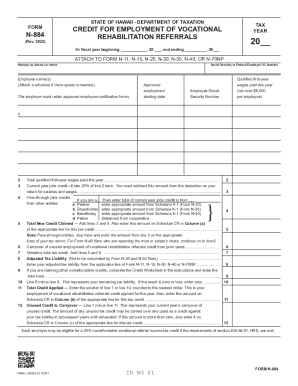
- Press the ‘Get Form’ button to access the HI DoT N-884 form and open it in the online editor.
- In the top section, enter the tax year for which you are claiming the credit, specifying the fiscal year beginning and ending dates.
- Provide the names of the employers as shown on the return, along with their Social Security or Federal Employer Identification Number.
- List the names of the employees who are vocational rehabilitation referrals. You may need to attach a separate schedule if there are multiple employees.
- Input the approved employment starting dates and the Social Security Numbers for each employee listed.
- Indicate the qualified first-year wages paid to each employee. Remember, this amount cannot exceed $6,000 per employee.
- Calculate the total qualified first-year wages paid by summing the amounts from the previous step.
- Determine the current year jobs credit by entering 20% of the total qualified first-year wages. Ensure you subtract this amount from your deduction for salaries and wages on your tax return.
- If applicable, enter the flow-through jobs credits based on your role as a partner, shareholder, or beneficiary, following the instructions provided for each scenario.
- Sum the current year jobs credit and any carryover from previous years to find the total new credit claimed.
- Complete the remaining lines as instructed before proceeding to the conclusion section.
- Finally, you will have options to save changes, download, print, or share the completed form.
Complete your documents online today and simplify your filing process.
Get form
Experience a faster way to fill out and sign forms on the web. Access the most extensive library of templates available.
The Mississippi Department of Revenue applies the automatic six-month extension if a federal extension has been accepted, and a copy of the federal extension is attached to the return when filed. An extension to file your return is not an extension of time to pay your taxes.
Get This Form Now!
Use professional pre-built templates to fill in and sign documents online faster. Get access to thousands of forms.