Loading
Get Hi Ta-2 2022-2026
How it works
-

Open form follow the instructions
-

Easily sign the form with your finger
-

Send filled & signed form or save
How to fill out the HI TA-2 online
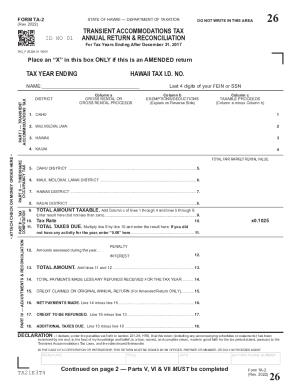
Filling out the HI TA-2 form is an essential step for reporting transient accommodations tax in Hawaii. This guide provides a detailed overview to assist users in accurately completing and submitting this form online.
Follow the steps to complete the HI TA-2 form effectively.
- Click ‘Get Form’ button to access the HI TA-2 document and open it in your preferred editor.
- Begin by entering the tax year ending date in the respective field to indicate the period for which you are filing the tax return.
- Provide your Hawaii Tax I.D. number to identify your tax account accurately.
- Fill in your full name in the designated name field. Ensure that it matches the name associated with your tax records.
- Complete Part I by entering gross rental proceeds for each district: Oahu, Maui, Molokai, Lanai, Hawaii, and Kauai. Input the amounts in Column a and any exemptions or deductions in Column b.
- Calculate the taxable proceeds by subtracting Column b from Column a for each district, and record this value in Column c.
- In Part II, if applicable, fill out the timeshare occupancy tax. Provide the total fair market rental value.
- Proceed to Part III to compute the tax owed. Multiply the total amount taxable from Part I by the appropriate tax rate.
- In Part IV, list any penalties or interest incurred and calculate the total amount due using the provided formulas.
- In the declaration section, sign and date the form. Ensure you provide your title if submitting on behalf of a corporation or partnership.
- Once all sections are complete, review the form for accuracy. You can then save your changes, download, print, or share the completed HI TA-2 form.
Take action today and file your HI TA-2 form online to ensure compliance with Hawaii's transient accommodations tax regulations.