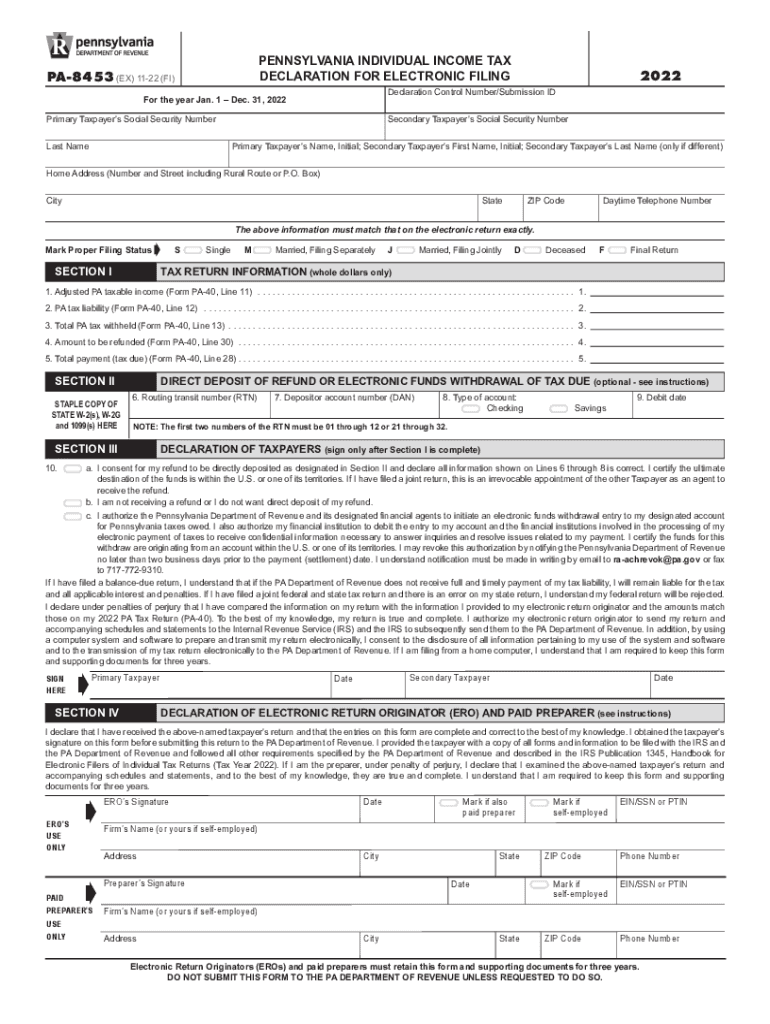
Ear Jan. 1 Dec. 31, 2022 Primary Taxpayer s Social Security Number Last Name 2022 Declaration Control Number/Submission ID Secondary Taxpayer s Social Security Number Primary Taxpayer s Name, Initial; Secondary Taxpayer s First Name, Initial; Secondary Taxpayer s Last Name (only if different) Home Address (Number and Street including Rural Route or P.O. Box) City State ZIP Code Daytime Telephone Number NO DASHES The above information must match that on the electronic retur.
Loading

Open form follow the instructions

Easily sign the form with your finger

Send filled & signed form or save
How to fill out the PA Form PA-8453 online
Filling out the PA Form PA-8453 online is an essential step for taxpayers who wish to declare their electronic filing for Pennsylvania individual income tax. This guide provides clear and detailed instructions to help users complete the form accurately and efficiently.
Follow the steps to successfully complete your PA Form PA-8453 online.
- Press the ‘Get Form’ button to download the PA Form PA-8453 onto your computer. Ensure you have opened the form in a compatible software application to edit it.
- Enter the primary taxpayer’s Social Security number and last name in the designated fields. Ensure that this information matches exactly with what is on your electronic tax return.
- Fill in the declaration control number or Submission ID as provided by your electronic return originator. Include the social security number and name details for any secondary taxpayer, if applicable.
- Complete the home address section with your complete address, including the number and street, city, state, and ZIP code.
- Provide a daytime telephone number without dashes. This is crucial for any potential follow-up communications regarding your submission.
- Select your proper filing status by marking the appropriate box: Single, Married Filing Separately, Married Filing Jointly, Deceased, or Final Return.
- In Section I, input your financial information based on the lines from Form PA-40: Adjusted taxable income, PA tax liability, total PA tax withheld, any refund amount, and total payment due, all in whole dollars only.
- If you wish to receive your refund through direct deposit or authorize an electronic funds withdrawal, fill out Section II accurately, including the routing transit number, depositor account number, and select the account type.
- In Section III, ensure to consent to the statements regarding direct deposit and confirm the information you have entered is correct by signing in the designated area after completing Section I.
- Finalize your form by signing and dating it in Section IV. Ensure both the primary and secondary taxpayers sign if applicable.
- After reviewing all sections for accuracy, save your changes. You may then download, print, or share the completed form as needed.
Start filling out your PA Form PA-8453 online now for a seamless tax filing experience.
Experience a faster way to fill out and sign forms on the web. Access the most extensive library of templates available.
Related content
signature on this form before submitting this return to the PA Department of Revenue....
L Year of formation: 1946 M State of legal domicile: PA ... withdrawal (direct debit) with...
17 Feb 2018 — Table 3–4: Scanned Form 8453 Method Authorization Form . ... PA –...
Use professional pre-built templates to fill in and sign documents online faster. Get access to thousands of forms.
If you believe that this page should be taken down, please follow our DMCA take down process here.