Loading
Get Pa Pa-40 E 2022-2026
How it works
-

Open form follow the instructions
-

Easily sign the form with your finger
-

Send filled & signed form or save
How to fill out the PA PA-40 E online
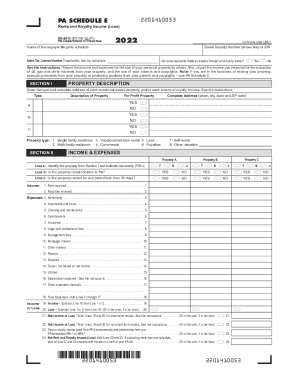
The PA PA-40 E form is essential for individuals reporting income or loss from rents, royalties, patents, and copyrights in Pennsylvania. This guide will provide a detailed walkthrough of each section and field of the form to ensure a smooth and accurate filing process.
Follow the steps to fill out the PA PA-40 E online effectively.
- Press the ‘Get Form’ button to download the PA PA-40 E form and open it in your editor.
- Begin by entering the taxpayer's name and Social Security Number (SSN) at the top of the form. If applicable, include the Sales Tax License Number as outlined in the instructions.
- Indicate whether rental payments are made through a third-party broker by selecting 'Yes' or 'No'.
- Proceed to Section I: Property Description. Enter the type and complete address of each rental property or source of royalty income, providing the appropriate codes as described in the instructions.
- In Section II: Income and Expenses, identify each property according to its ownership and address whether the rental location is within Pennsylvania. Respond to whether the property is rented for less than 30 days.
- Report the gross rent and royalties received, as well as each related expense, ensuring accuracy in the amounts reported across lines 1 through 17.
- Calculate the total expenses and determine the net income or loss by completing lines 19 through 24. Make sure to fill in the ovals where required.
- When completed, you can save changes to your document, download it, print it, or share it as necessary.
Start your online filing process by completing the PA PA-40 E form today.
Padirectfile: A secure, state-only electronic filing system offered exclusively through the Department of Revenue which allows most taxpayers to prepare and submit their Pennsylvania personal income tax return for free. ...