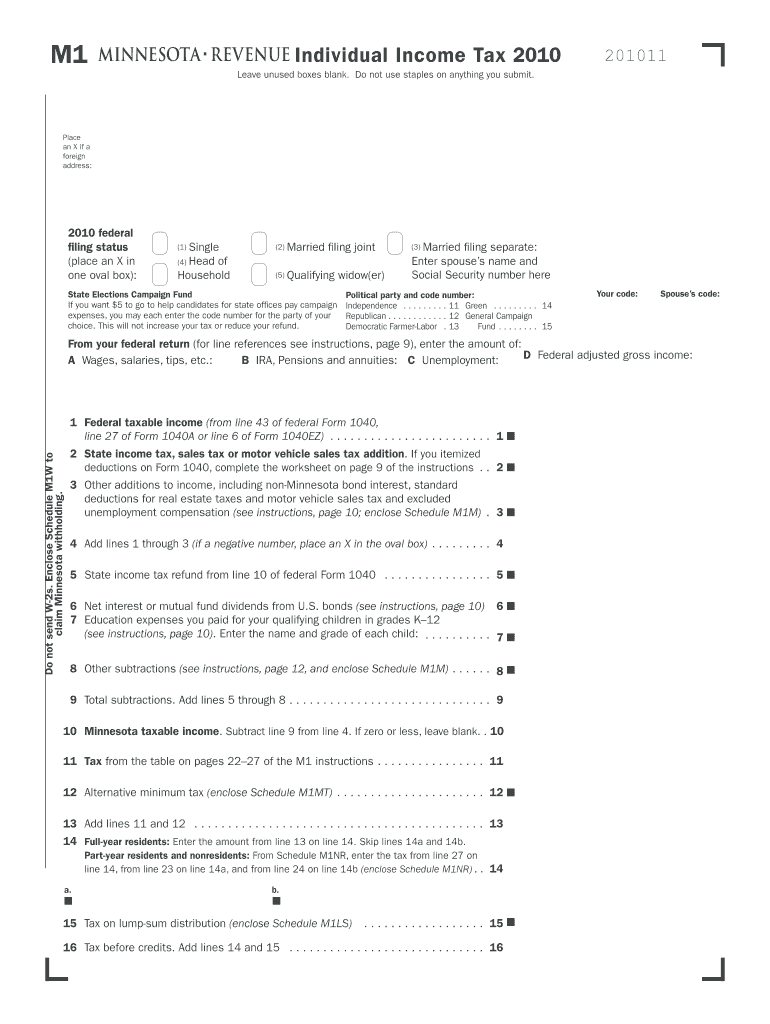
M1Individual Income Tax 2010 Leave unused boxes blank. Do not use staples on anything you submit. Your first name and initial joint return, spouse's first name & initial Place an X if a foreign address:.
Loading

Open form follow the instructions

Easily sign the form with your finger

Send filled & signed form or save
How to fill out the MN DoR M1 online
Filling out the MN DoR M1 form online can streamline the process of submitting your individual income tax return. This guide will walk you through the necessary steps to complete the form accurately and efficiently.
Follow the steps to complete the MN DoR M1 online
- Click ‘Get Form’ button to obtain the MN DoR M1 form and open it in your preferred editor.
- Begin by entering your first name and initial in the appropriate fields. If you are filing jointly, include your spouse's first name and initial in the designated area.
- Next, provide your current home address, including street name, apartment number (if applicable), city, state, and zip code.
- Fill in your last name and Social Security number, followed by your spouse's last name and Social Security number if applicable.
- Enter your date of birth in the specified format (mmddyyyy) and include your spouse’s date of birth if filing jointly.
- Select your federal filing status by placing an X in the appropriate oval box: options include single, married filing jointly, married filing separately, head of household, or qualifying widow(er).
- If desired, contribute $5 to the state elections campaign fund by entering the code number for the political party of your choice; this will not affect your tax amount or refund.
- Proceed to report your federal adjusted gross income using the values from your federal return. Complete all relevant fields to include wages, unemployment, and other income sources.
- Calculate and report any state income tax refund, net interest, education expenses for qualifying children, and other subtractions as indicated in the form.
- Complete calculations through to the total nonrefundable credits and the total payments section, ensuring to enclose associated schedules as mentioned in the instructions.
- Finally, review your completed form for accuracy. You can then save your changes, download a copy, print it, or share it as necessary.
Ensure to complete your documents online for a seamless filing experience.
Experience a faster way to fill out and sign forms on the web. Access the most extensive library of templates available.
Related content
The reciprocity agreement between Wisconsin and Minnesota expired January 1, 2010. The...
... reserve a room, track packages, or find help - It's all right here. Got To Info Desk...
M N (PLAY/STOP). Message indicator. MANSWER ... –MN/M N: Repeat/skip messages...
Get answers to your most pressing questions about US Legal Forms API.
What is adjusted gross income on w2?
Answer. Adjusted Gross Income is simply your total gross income minus specific deductions. Additionally, your Adjusted Gross Income is the starting point for calculating your taxes and determining your eligibility for certain tax credits and deductions that you can use to help you lower your overall tax bill.
What is Adjusted Gross Income 2018?
Adjusted Gross Income (AGI) is defined as gross income minus adjustments to income. We suggest you refer to your 2018 federal income tax return to get a quick estimate of your 2018 AGI. On your 2018 return, please refer to: Line 4 if you filed a Form 1040EZ.
How do you calculate adjusted gross income?
Start with your gross income. Income is on lines 7-22 of Form 1040. Add these together to arrive at your total income. Subtract your adjustments from your total income (also called above-the-line deductions ) You have your AGI.
What is federal adjusted gross income?
In the United States income tax system, adjusted gross income (AGI) is an individual's total gross income minus specific deductions. Taxable income is adjusted gross income minus allowances for personal exemptions and itemized deductions. For most individual tax purposes, AGI is more relevant than gross income.
Is guaranteed payments a permanent difference?
Guaranteed payments are not subject to income tax withholding. The partnership generally deducts guaranteed payments on Form 1065, line 10, as a business expense. They are also listed on Schedules K and K-1 of the partnership return.
What is the purpose of Schedule M 3?
Purpose of Schedule Schedule M-3, Parts II and III, reconcile financial statement net income (loss) for the U.S. corporation (or consolidated tax group, if applicable), as reported on Schedule M-3, Part I, line 11, to taxable income on Form 1120, page 1, line 28.
What is the purpose of Schedule M 2?
Schedule M-1 is reconciliation of income per books -- income before taxes as shown on your accounting records -- with income per return for the tax year -- or how much income was reported on your corporate tax return; Schedule M-2 is an analysis of unappropriated retained earnings per books.
What is a Schedule M 1?
Schedule M-1 is the section of the Form 1065 - U.S. Return of Partnership Income where the entity reconciles the income that the partnership is reporting on the tax return (Form 1065) to the income that the entity has on its accounting records or books.
What is the purpose of Schedule M 1?
Common Book-Tax Differences on Schedule M-1 for 1120. The purpose of the Schedule M-1 is to reconcile the entity's accounting income (book income) with its taxable income.
What is Schedule m3?
This Schedule M-3 is being filed because (check all that apply): A The amount of the partnership's total assets at the end of the tax year is equal to $10 million or more. ... more in the partnership's capital, profit, or loss on any day during the tax year of the partnership.
Use professional pre-built templates to fill in and sign documents online faster. Get access to thousands of forms.
If you believe that this page should be taken down, please follow our DMCA take down process here.
This form is available in several versions. Select the version you need from the drop-down list below.