Loading
Form preview
  • US Legal Forms
  • Other Templates
  • Tax Forms
  • Rhode Island Tax Forms
  • Ri Tx-16 2022

Get Ri Tx-16 2022-2026

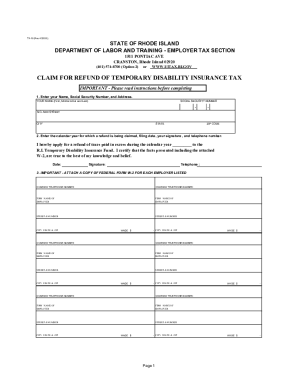
IM FOR REFUND OF TEMPORARY DISABILITY INSURANCE TAX IMPORTANT - Please read instructions before completing 1. Enter your Name, Social Security Number, and Address. YOUR NAME (First, Middle Initial and Last) SOCIAL SECURITY NUMBER - - NO. AND STREET CITY STATE ZIP CODE 2. Enter the calendar year for which a refund is being claimed, filing date, your signature , and telephone number. I hereby apply for a refund of taxes paid in excess during the calendar year to the R.I. Tempora.

How it works

  1. Open form

    Open form follow the instructions

  2. Easily sign form

    Easily sign the form with your finger

  3. Share form

    Send filled & signed form or save

How to fill out the RI TX-16 online

Filling out the RI TX-16 form online is a straightforward process that can help you claim a refund for overpaid temporary disability insurance taxes. This guide will walk you through each section of the form to ensure that you complete it accurately and efficiently.

Follow the steps to successfully fill out the RI TX-16 online.

  1. Click ‘Get Form’ button to obtain the form and open it in the editor.
  2. In section 1, enter your full name, Social Security Number, and address. Ensure that the information is complete and accurately reflects your details.
  3. For section 2, indicate the calendar year for which you are claiming a refund, your signature, and your telephone number. Double-check the accuracy of these details.
  4. In section 3, list each employer for whom you worked during the calendar year. Enter the employer's firm name, address, telephone number, and the wages received. This section is critical and must only include employers registered in Rhode Island.
  5. Attach a copy of Form W-2 for each employer listed. Remember, each employer must have a different Federal Identification Number, and photocopies will not be accepted.
  6. Review the entire claim for refund form to ensure all information is correct and complete. Sign the form before submission.
  7. Once reviewed, save your changes and either print the form or share it as required. Make sure to send the completed form to the specified address for processing.

Start filling out your document online to claim your refund effortlessly.

Get form

Experience a faster way to fill out and sign forms on the web. Access the most extensive library of templates available.
Get form

Related content

Rhode Island Employer Tax Forms
tx-13.pdf. TX-16. Claim for Refund of Temporary Disability Insurance Tax with...
Learn more
Brown University
Brown is a leading research university, home to world-renowned faculty and also an...
Learn more

Related links form

Monitor Checklist For Day Care Homes CACFP-4118 - Planaheadnewyork Cms Exhibit 286 IEEE Paper Word Template In A4 Page Size (V3) - IJENS Incident/Accident Report Form Witness's Report Of Injury - Ftp1 Sd34 Bc

Questions & Answers

Get answers to your most pressing questions about US Legal Forms API.

Contact support

In order to close your LLC, you will need to remit a Request for a Letter of Good Standing to the RI Division of Taxation. ... If you have a sales tax and/or withholding account, close your account by completing and filing a Final Return Form.

Rhode Island imposes a 7 percent sales tax on the sale of most tangible items. However, the state offers exemptions on a range of goods and services, as well as for certain organizations and types of sales. Common exempt goods include clothing and footwear, food, and medical items.

Generally, Rhode Island withholding is required to be withheld from the wages of an employee by a Rhode Island employer.

Rhode Island Withholding: What you need to know Employers must withhold state income taxes at the time of each wage payment. ... Rhode Island does not require employers to obtain a separate certificate showing the number of dependents or other personal exemptions claimed by an employee.

Under the Rhode Island personal income tax system, as under the Federal system, employers are required to withhold a portion of each employee's wages and to periodically remit these funds withheld to the Division of Taxation.

Schedule 1 is for taxpayers with additional sources of income (not from a W-2) or adjustments to income, such as IRA contributions, student loan interest, and health savings account contributions. Schedule 2 is a form for people with some other forms of taxes, such as on a child's unearned income.

The letters SCH entered to the left of Line 7 of the tax return and the number shown is the amount of taxable scholarship that is entered on Line 7. SCH stands for Scholarship and the amount is included in your taxable income and therefore included as part of your AGI.

What Are Tax Schedules? A tax schedule is a form the IRS requires you to prepare in addition to your tax return when you have certain types of income or deductions. These commonly include things like significant amounts of interest income, mortgage interest or charitable contributions.

What is IRS Schedule 1? A lot of the information on Schedule 1 used to be on the old Form 1040, like business income and health savings account, or HSA, deductions. But the revised Form 1040 took information from the old 1040 and moved it to a series of new forms, called schedules.

Schedule W is designed to report State of Michigan income Completing the Withholding Tables. tax withholding. Schedule W enables us to process your Lines not listed are explained on the form. individual income tax return more efficiently.

Get This Form Now!

Use professional pre-built templates to fill in and sign documents online faster. Get access to thousands of forms.
Get form
If you believe that this page should be taken down, please follow our DMCA take down processhere.
Get RI TX-16
Get form
  • Adoption
  • Bankruptcy
  • Contractors
  • Divorce
  • Home Sales
  • Employment
  • Identity Theft
  • Incorporation
  • Landlord Tenant
  • Living Trust
  • Name Change
  • Personal Planning
  • Small Business
  • Wills & Estates
  • Packages A-Z
  • Affidavits
  • Bankruptcy
  • Bill of Sale
  • Corporate - LLC
  • Divorce
  • Employment
  • Identity Theft
  • Internet Technology
  • Landlord Tenant
  • Living Wills
  • Name Change
  • Power of Attorney
  • Real Estate
  • Small Estates
  • Wills
  • All Forms
  • Forms A-Z
  • Other Templates
  • Legal Hub
  • About Us
  • Help Portal
  • Legal Resources
  • Blog
  • Affiliates
  • Contact Us
  • Delete My Account
  • Site Map
  • Industries
  • Forms in Spanish
  • Localized Forms
  • State-specific Forms
  • Forms Kit
  • Real Estate Handbook
  • All Guides
  • Notarize
  • Incorporation services
  • For Consumers
  • For Small Business
  • For Attorneys
  • USLegal
  • FormsPass
  • pdfFiller
  • signNow
  • altaFlow
  • DocHub
  • Instapage
Form Packages
  • Adoption
  • Bankruptcy
  • Contractors
  • Divorce
  • Home Sales
  • Employment
  • Identity Theft
  • Incorporation
  • Landlord Tenant
  • Living Trust
  • Name Change
  • Personal Planning
  • Small Business
  • Wills & Estates
  • Packages A-Z
Form Categories
  • Affidavits
  • Bankruptcy
  • Bill of Sale
  • Corporate - LLC
  • Divorce
  • Employment
  • Identity Theft
  • Internet Technology
  • Landlord Tenant
  • Living Wills
  • Name Change
  • Power of Attorney
  • Real Estate
  • Small Estates
  • Wills
  • All Forms
  • Forms A-Z
  • Other Templates
Customer Service
  • Legal Hub
  • About Us
  • Help Portal
  • Legal Resources
  • Blog
  • Affiliates
  • Contact Us
  • Delete My Account
  • Site Map
  • Industries
  • Forms in Spanish
  • Localized Forms
  • State-specific Forms
  • Forms Kit
Legal Guides
  • Real Estate Handbook
  • All Guides
Prepared for you
  • Notarize
  • Incorporation services
Our Customers
  • For Consumers
  • For Small Business
  • For Attorneys
Our Sites
  • USLegal
  • FormsPass
  • pdfFiller
  • signNow
  • altaFlow
  • DocHub
  • Instapage
Social Media
Call us now toll free:
+1 833 426 79 33
As seen in:
© Copyright 1999-2026 airSlate Legal Forms, Inc. 17 Station Street, Suite 303, Brookline, MA 02445
  • Your Privacy Choices
  • Terms of Service
  • Privacy Notice
  • Content Takedown Policy
  • Bug Bounty Program