Loading
Get Ks Dor Cte-50 2022-2026
How it works
-

Open form follow the instructions
-

Easily sign the form with your finger
-

Send filled & signed form or save
How to fill out the KS DoR CTE-50 online
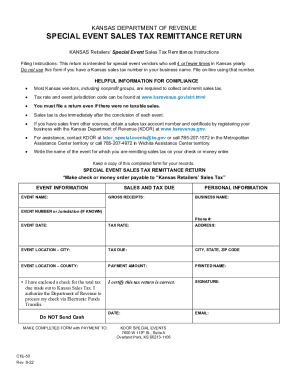
Filling out the Kansas Department of Revenue CTE-50 form for special event sales tax remittance can seem daunting. This guide is designed to support you through each step of the process, ensuring you provide the required information accurately and completely.
Follow the steps to accurately complete the KS DoR CTE-50 form.
- Click ‘Get Form’ button to obtain the form and open it for editing.
- Begin with the event information section. Enter the name of the event for which you are remitting sales tax in the 'Event Name' field.
- Next, fill in the 'Gross Receipts' field, which should reflect the total income from sales made during the event.
- In the personal information section, input your 'Business Name' as it appears on your official documents.
- If you know your 'Event Number' or jurisdiction, enter it in the corresponding field. Provide your contact 'Phone #' for further communication.
- Fill in the 'Event Date' to specify when the event took place.
- Indicate the 'Tax Rate' applicable to the sales made during the event. Reference the relevant tax rate for your jurisdiction.
- In the address section, complete the 'Event Location – City' field, followed by the 'Event Location – County'.
- Calculate and enter the 'Tax Due' based on the applicable tax rate and gross receipts.
- Provide the 'Payment Amount', which should match the calculated tax amount due.
- Sign and date the form, ensuring that you also print your name in the 'Printed Name' field.
- If submitting payment by check, ensure it is enclosed and made out to 'Kansas Retailers’ Sales Tax'.
- Review the completed form for accuracy before saving your changes, downloading, printing, or sharing as necessary.
Take the next step and complete your document online today.