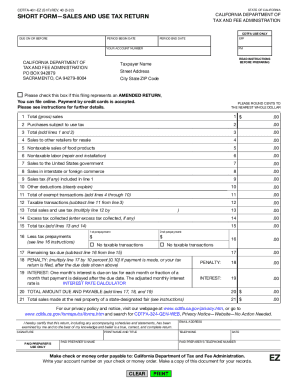
Get Ca Cdtfa-401-ez (formerly Boe-401-ez) 2022-2025
How it works
-

Open form follow the instructions
-

Easily sign the form with your finger
-

Send filled & signed form or save
Tips on how to fill out, edit and sign CA CDTFA-401-EZ (formerly BOE-401-EZ) online
How to fill out and sign CA CDTFA-401-EZ (formerly BOE-401-EZ) online?
Get your online template and fill it in using progressive features. Enjoy smart fillable fields and interactivity.Follow the simple instructions below:
When the tax season began unexpectedly or you just forgot about it, it would probably cause problems for you. CA CDTFA-401-EZ (formerly BOE-401-EZ) is not the simplest one, but you do not have reason for panic in any case.
Utilizing our powerful on-line software you will see the right way to fill up CA CDTFA-401-EZ (formerly BOE-401-EZ) in situations of critical time deficit. The only thing you need is to follow these elementary instructions:
-
Open the document using our powerful PDF editor.
-
Fill in the information needed in CA CDTFA-401-EZ (formerly BOE-401-EZ), making use of fillable fields.
-
Add images, crosses, check and text boxes, if you need.
-
Repeating info will be added automatically after the first input.
-
In case of troubles, turn on the Wizard Tool. You will receive some tips for simpler finalization.
-
Do not forget to add the date of application.
-
Draw your unique signature once and place it in the required fields.
-
Check the information you have written. Correct mistakes if needed.
-
Click Done to finalize modifying and choose the way you will send it. There is the possibility to use digital fax, USPS or e-mail.
-
It is possible to download the document to print it later or upload it to cloud storage like Dropbox, OneDrive, etc.
Using our powerful digital solution and its beneficial tools, completing CA CDTFA-401-EZ (formerly BOE-401-EZ) becomes more practical. Do not wait to work with it and have more time on hobbies instead of preparing documents.
How to edit CA CDTFA-401-EZ (formerly BOE-401-EZ): customize forms online
Benefit from the usability of the multi-featured online editor while filling out your CA CDTFA-401-EZ (formerly BOE-401-EZ). Use the diversity of tools to rapidly fill out the blanks and provide the requested data in no time.
Preparing documentation is time-consuming and expensive unless you have ready-made fillable templates and complete them electronically. The most effective way to deal with the CA CDTFA-401-EZ (formerly BOE-401-EZ) is to use our professional and multi-functional online editing tools. We provide you with all the essential tools for prompt document fill-out and allow you to make any adjustments to your forms, adapting them to any needs. Aside from that, you can make comments on the changes and leave notes for other parties involved.
Here’s what you can do with your CA CDTFA-401-EZ (formerly BOE-401-EZ) in our editor:
- Complete the blank fields using Text, Cross, Check, Initials, Date, and Sign tools.
- Highlight important details with a favorite color or underline them.
- Hide sensitive details with the Blackout tool or simply remove them.
- Import images to visualize your CA CDTFA-401-EZ (formerly BOE-401-EZ).
- Substitute the original text with the one corresponding with your needs.
- Leave comments or sticky notes to inform others on the updates.
- Create additional fillable areas and assign them to specific people.
- Protect the template with watermarks, add dates, and bates numbers.
- Share the paperwork in various ways and save it on your device or the cloud in different formats as soon as you finish modifying.
Dealing with CA CDTFA-401-EZ (formerly BOE-401-EZ) in our powerful online editor is the quickest and most effective way to manage, submit, and share your documentation the way you need it from anywhere. The tool operates from the cloud so that you can access it from any place on any internet-connected device. All forms you generate or fill out are safely stored in the cloud, so you can always access them whenever needed and be assured of not losing them. Stop wasting time on manual document completion and eliminate papers; make it all online with minimum effort.
No, they're not. Entities (including consumers) in California are taxed on their purchases or consumption of various physical products, such as cleaning supplies, clothing, school supplies, and so on. However, they don't pay taxes for using the services of a lawyer, a dentist, or a plumber.
Industry-leading security and compliance
-
In businnes since 199725+ years providing professional legal documents.
-
Accredited businessGuarantees that a business meets BBB accreditation standards in the US and Canada.
-
Secured by BraintreeValidated Level 1 PCI DSS compliant payment gateway that accepts most major credit and debit card brands from across the globe.