Loading
Get Ny Dtf St-100-att 2022-2026
How it works
-

Open form follow the instructions
-

Easily sign the form with your finger
-

Send filled & signed form or save
How to fill out the NY DTF ST-100-ATT online
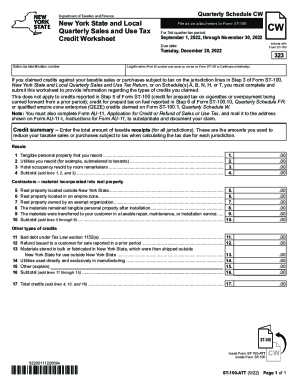
The NY DTF ST-100-ATT is an essential form for reporting credits claimed on your sales and use tax returns. This guide provides clear, step-by-step instructions to assist users in completing the form online efficiently and accurately.
Follow the steps to fill out the NY DTF ST-100-ATT online.
- Click 'Get Form' button to obtain the form and open it in the editor.
- Enter your sales tax identification number in the designated field. This number is crucial for processing your submission.
- Provide your legal name as it appears on Form ST-100 or your Certificate of Authority. Accuracy is important to avoid processing delays.
- In the credit summary section, report the total amount of taxable receipts from all jurisdictions. These figures will help in determining the tax credits you are eligible to claim.
- Complete the subsequent lines detailing specific types of credits. For example, fill in any resale amounts and values of tangible personal property resold.
- Proceed to enter data for any real property located outside New York State or within an empire zone, as applicable.
- Continue filling out the sections for contractors and other credit types as needed, ensuring each amount is clearly noted.
- Once all relevant information has been entered, calculate the total credits by adding the applicable amounts and ensure they are correctly summed.
- When finished, review all entries for accuracy. Users can then save changes, download, print, or share the completed form as necessary.
Complete your document online today for a smoother filing experience.