Loading
Get Mn Schedule M15 2022-2026
How it works
-

Open form follow the instructions
-

Easily sign the form with your finger
-

Send filled & signed form or save
How to fill out the MN Schedule M15 online
Filling out the MN Schedule M15 can seem daunting, but this guide will walk you through each step of the process clearly and succinctly. Whether you are a new filer or have experience, you will find this guide helpful for completing the form accurately and efficiently.
Follow the steps to complete the MN Schedule M15 online.
- Click ‘Get Form’ button to obtain the form and open it in the editor.
- Enter your first name and initial in the appropriate field. Ensure that you also fill in your last name and Social Security number in the designated sections to identify your filing.
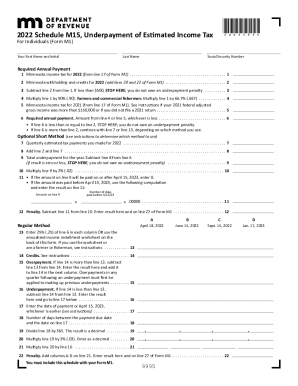
- Locate line 1 and input your Minnesota income tax for 2022, which can be found on line 17 of Form M1.
- Proceed to line 2 and add your Minnesota withholding and credits for 2022, specifically from lines 20 and 22 of Form M1.
- On line 3, subtract the amount in line 2 from line 1. If the result is less than $500, you do not owe an underpayment penalty; you may stop here. If it is greater, continue to line 4.
- Line 4 requires you to multiply line 1 by 90% (0.90). If you are a farmer or commercial fisherman, multiply line 1 by 66.7% (0.667).
- For line 5, enter the Minnesota income tax for 2021, which can also be found on line 17 of Form M1. Refer to the instructions if your 2021 federal adjusted gross income exceeded $150,000 or if you did not file a 2021 return.
- Line 6 requires you to take the lesser of the amounts from line 4 or line 5. Enter this amount here. Note that if this number is less than or equal to line 2, you stop here as there is no underpayment penalty owed.
- If applicable, follow the prompts for the Optional Short Method starting with line 7, where you will enter the total quarterly estimated tax payments made for 2022.
- On line 8, add the amounts from line 2 and line 7, then move to line 9 to find your total underpayment for the year by subtracting line 8 from line 6, if applicable.
- Continue to line 10 and multiply line 9 by 2% (0.02) for your calculated potential penalty.
- If payment was made before or on April 15, 2023, follow the instructions for calculating any applicable penalties and input the results on line 12 as necessary.
- For the Regular Method, complete lines A through D, comparing figures and entering data as prompted through lines 13 to 22. Be sure to include any credits and overpayments as detailed in the instructions, ensuring accuracy throughout.
Complete your documents online with confidence!