Loading
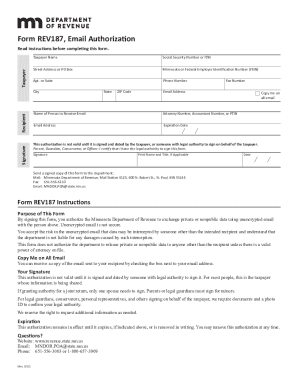
Get Mn Rev187 2022-2026
How it works
-

Open form follow the instructions
-

Easily sign the form with your finger
-

Send filled & signed form or save
How to fill out the MN REV187 online
This guide provides comprehensive instructions on how to effectively fill out the MN REV187, an online form for email authorization with the Minnesota Department of Revenue. By following this user-friendly guide, you will ensure that your form is completed accurately and submitted without hassle.
Follow the steps to complete the MN REV187 online.
- Click the ‘Get Form’ button to access the MN REV187 and open it in your chosen editor.
- Begin by entering the taxpayer's name in the designated field. This is a crucial section as it identifies the individual authorizing the email communication.
- Provide the Social Security Number or Individual Taxpayer Identification Number (ITIN) in the specified area. Ensure that this information is accurate and corresponds to the taxpayer.
- Fill in the street address or PO Box of the taxpayer. If applicable, include the apartment or suite number for precise identification.
- Input the city, state, and ZIP code associated with the taxpayer’s address.
- Enter the Minnesota or Federal Employer Identification Number (FEIN) if applicable, as this can be useful for tax purposes.
- Provide a contact phone number to facilitate communication regarding the authorization.
- Include the email address for the person who will receive email communications. Make sure this is correct to ensure confidentiality and usability.
- If desired, check the box to indicate that you would like to receive a copy of all emails sent to the recipient.
- Specify the name of the person who will receive the email, ensuring they are listed clearly in the appropriate section.
- If applicable, fill in your fax number.
- Complete the Attorney Number, Accountant Number, or Preparer Tax Identification Number (PTIN) field if it pertains to your situation.
- Review and confirm that all information is accurate. Once verified, it is essential for the taxpayer or an authorized individual to sign and date the form. This includes the printed name and title if applicable.
- Finally, save your changes, and download or print the completed form. You can then submit it via mail, fax, or email to the Minnesota Department of Revenue, as provided in the form instructions.
Complete your MN REV187 form online today to ensure swift authorization and communications with the Minnesota Department of Revenue.