Loading
Get Hi Dot U-6 2022
How it works
-

Open form follow the instructions
-

Easily sign the form with your finger
-

Send filled & signed form or save
How to fill out the HI DoT U-6 online
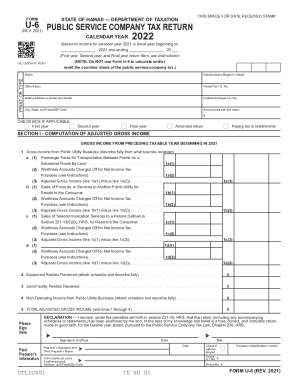
The HI DoT U-6 form is a crucial document for public service companies in Hawaii, used for reporting income and computing taxes. This guide provides a step-by-step approach to filling out the form online, ensuring accurate and efficient completion.
Follow the steps to complete the HI DoT U-6 form online effectively.
- Select the ‘Get Form’ button to access the HI DoT U-6 form and open it in your preferred online editor.
- Enter your name as it appears on your return, along with your Hawaii Tax I.D. number and Federal Employer I.D. number. Include your business's mailing address, city, state, and postal/ZIP code.
- Indicate the date your business began operating in Hawaii and check the applicable boxes for first year, second year, final year, amended return, or paying tax in installments.
- Proceed to section I, where you will compute your adjusted gross income. Enter the gross income from your public utility business alongside any deductions, like worthless accounts, as detailed in the form.
- Complete section II by calculating the tax based on specified tax rates applicable to your reported adjusted gross income. Follow the instructions carefully to ensure accuracy.
- Sign and date the form where indicated, ensuring all necessary preparer information is filled out if applicable. This includes the preparer's name, identification number, and contact information.
- Once completed, save any changes made to the form. You can choose to download a copy, print it for your records, or share it as needed.
Complete and submit your HI DoT U-6 form online to ensure timely and accurate reporting of your public service company taxes.
Get form
Experience a faster way to fill out and sign forms on the web. Access the most extensive library of templates available.
But the revised Form 1040 took information from the old 1040 and moved it to a series of new forms, called schedules. On Schedule 1, you'll report types of income that aren't listed on the 1040, such as capital gains, unemployment payments and gambling winnings. On the 1040, you can only enter common types of income.
Get This Form Now!
Use professional pre-built templates to fill in and sign documents online faster. Get access to thousands of forms.