Loading
Get Ma Dor 3m 2021-2026
How it works
-

Open form follow the instructions
-

Easily sign the form with your finger
-

Send filled & signed form or save
How to fill out the MA DoR 3M online
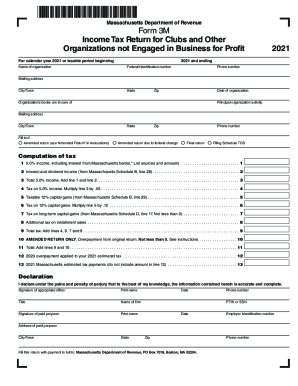
Filing the Massachusetts Department of Revenue Form 3M online is essential for clubs and organizations not engaged in business for profit. This guide provides a clear, step-by-step approach to completing the form accurately and efficiently.
Follow the steps to successfully fill out the MA DoR 3M form.
- Press the ‘Get Form’ button to access the form and open it in the editor.
- Enter the name of your organization in the designated field.
- Input your Federal Identification number as required.
- Provide a contact phone number for your organization, ensuring it is accurate.
- Fill in the state where your organization is located.
- Specify the date of organization in the format requested on the form.
- Complete the mailing address section, including city/town and zip code.
- Indicate the name and contact details of the person in care of the organization's books.
- Describe the principal activity of the organization succinctly.
- If applicable, fill in any options for amended returns or if this is a final return.
- Proceed to the computations section to enter income data, calculating totals as required.
- Complete the declaration area with a signature from the appropriate officer and required details.
- Review the entire form for accuracy and completeness.
- Once completed, save your changes, and choose to download, print, or share the form as needed.
Complete your MA DoR 3M form online today for a streamlined filing process.