Loading
Get De Dor Form 373 2013-2026
How it works
-

Open form follow the instructions
-

Easily sign the form with your finger
-

Send filled & signed form or save
How to fill out the DE DoR Form 373 online
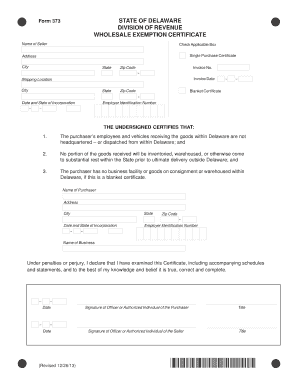
The DE DoR Form 373, also known as the Wholesale Exemption Certificate, is essential for documenting exempt sales to out-of-state purchasers picking up goods in Delaware. This guide provides a clear, step-by-step process to assist users in completing this form online effectively.
Follow the steps to complete the DE DoR Form 373 online.
- Click the ‘Get Form’ button to access the DE DoR Form 373 and open it in your preferred online editor.
- Begin by entering the name of the seller in the designated field.
- Check the applicable box to indicate whether this is a Single Purchase Certificate or a Blanket Certificate.
- Fill out the seller's address, including city, state, and zip code.
- Provide the invoice number and invoice date in the appropriate fields.
- Enter the shipping location details including city, state, and zip code.
- For Blanket Certificates, include the date and state of incorporation as well as the employer identification number (EIN) of the seller.
- Next, confirm that the purchaser's employees and vehicles receiving the goods do not operate out of Delaware and complete the additional certification statements provided.
- Fill in the purchaser's details, including their name, address, city, state, zip code, date, and state of incorporation, as well as their EIN.
- Complete the fields for the name of the business associated with the purchaser.
- Ensure that the form contains the signatures of both the officer or authorized individual of the purchaser and the seller, along with their titles and dates.
- Review all information for accuracy then save changes, download, print, or share the completed form as required.
Complete your DE DoR Form 373 online today to ensure your exempt sales are documented correctly.