Loading
Get Ks Mf-206 2013
How it works
-

Open form follow the instructions
-

Easily sign the form with your finger
-

Send filled & signed form or save
How to fill out the KS MF-206 online
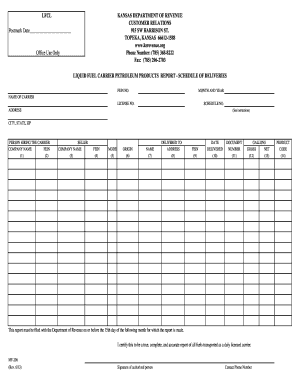
The KS MF-206 is an essential document for reporting petroleum product deliveries as a licensed fuel carrier in Kansas. This guide provides a step-by-step approach to help you navigate the filling process online, ensuring that all required information is accurately captured.
Follow the steps to successfully complete the KS MF-206 online form.
- Click the ‘Get Form’ button to access the online version of the KS MF-206. This will allow you to initiate the process and view the form in a user-friendly format.
- Begin filling out the form by providing the postmark date at the top of the form where indicated.
- Enter the federal employer identification number (FEIN) and the month and year relevant to the deliveries.
- In the ‘Name of Carrier’ section, input your company's name along with your license number.
- For the ‘Schedule No.’, provide the specific schedule number for your report.
- Complete the address section with your carrier's physical address, including city, state, and ZIP code.
- Provide the name and FEIN of the person hiring the carrier in columns (1) and (2). Make sure to fill in both fields accurately.
- In columns (3) and (4), enter the seller's details including the seller's company name and FEIN.
- Select the mode of transport from the options in column (5). You can choose among Truck, Rail, Pipeline, Ship, or Barge.
- For column (6), indicate the origin of the delivery by entering the appropriate city, state, or terminal code.
- In columns (7), (8), and (9), provide the name, address, and FEIN of the delivery point.
- Enter the date of delivery in column (10) in the format MM DD YY.
- In column (11), include the document number issued by the terminal related to the delivery.
- Finally, record the number of gross and net gallons as well as the product code in columns (12), (13), and (14). Refer to the product code list for appropriate codes.
- Once you have filled out all the required fields, you may save your changes, download the completed form, print it, or share it as necessary.
Submit your KS MF-206 online efficiently and ensure compliance with the reporting requirements.
Get form
Experience a faster way to fill out and sign forms on the web. Access the most extensive library of templates available.
If you have a valid Federal tax extension (IRS Form 4868), you will automatically receive a Kansas tax extension. Make sure to include a copy of your Federal extension with your Kansas tax return when it's filed.
Get This Form Now!
Use professional pre-built templates to fill in and sign documents online faster. Get access to thousands of forms.