Loading
Get Ks Dor Tr-81 2011
How it works
-

Open form follow the instructions
-

Easily sign the form with your finger
-

Send filled & signed form or save
How to fill out the KS DoR TR-81 online
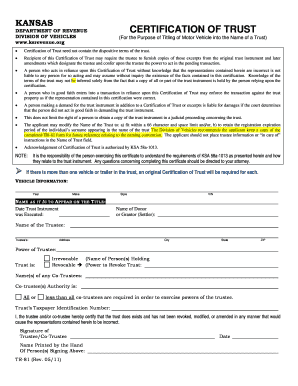
Filling out the KS DoR TR-81 form online is an essential step for individuals looking to certify a trust for motor vehicle titling. This guide provides clear, step-by-step instructions to help you navigate the process with confidence.
Follow the steps to complete the KS DoR TR-81 form.
- Click the ‘Get Form’ button to obtain the form and open it in an appropriate editor.
- Begin by entering the vehicle information. You will need to provide the year, make, style, and VIN (Vehicle Identification Number) of the vehicle being titled.
- In the ‘Name as it is to appear on the title’ section, enter the name of the trust. Ensure the name fits within the 66-character limit and does not include trustee information or 'in care of' instructions.
- Next, fill in the date when the trust instrument was executed. This information is crucial for validating the trust's legitimacy.
- Provide the name of the donor or grantor (settler) of the trust, followed by the name of the trustee responsible for the trust.
- Include the trustee's address, including city, state, and ZIP code to ensure accurate identification.
- Indicate whether the trust is revocable or irrevocable. If it is revocable, specify who holds the power to revoke the trust.
- If there are co-trustees, list their names and clarify whether all or less than all co-trustees are required to exercise powers of the trustee.
- Enter the trust's taxpayer identification number, which is necessary for taxation purposes.
- The trustee or co-trustee must then certify the trust's existence by signing and printing their name along with the date.
- Finally, save the changes to the form. You may download, print, or share the completed KS DoR TR-81 form for your records.
Complete and submit your KS DoR TR-81 form online today for seamless processing.
Get form
Experience a faster way to fill out and sign forms on the web. Access the most extensive library of templates available.
To transfer ownership of a title in Kansas, you'll want to start with the KS DoR TR-81 form. This form collects all the necessary information for the transfer. After that, both the buyer and seller must sign the title, and you should take it to the county treasurer's office for processing. This step is crucial to ensure that the title transfer is recognized legally.
Get This Form Now!
Use professional pre-built templates to fill in and sign documents online faster. Get access to thousands of forms.