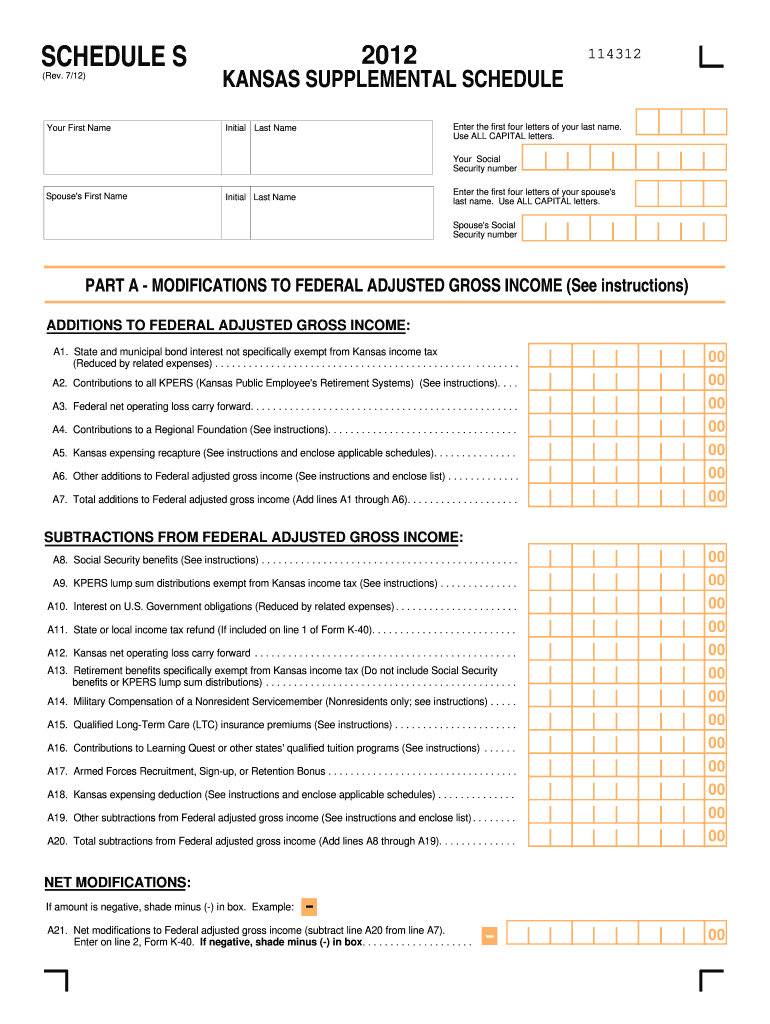
Number Spouse's First Name Enter the first four letters of your spouse's last name. Use ALL CAPITAL letters. Initial Last Name Spouse's Social Security number PART A - MODIFICATIONS TO FEDERAL ADJUSTED GROSS INCOME (See instructions) ADDITIONS TO FEDERAL ADJUSTED GROSS INCOME: A1. State and municipal bond interest not specifically exempt from Kansas income tax (Reduced by related expenses) . . . . . . . . . . . . . . . . . . . . . . . . . . . . . . . . . . . . . . . . . . . . . . . . . . .
Loading

Open form follow the instructions

Easily sign the form with your finger

Send filled & signed form or save
How to fill out the KS DoR Schedule S online
The KS DoR Schedule S is an essential document for reporting income modifications and allocation for Kansas residents and nonresidents. This guide will provide clear, step-by-step instructions to help you complete this form online, ensuring accuracy and compliance with state requirements.
Follow the steps to complete the KS DoR Schedule S online.
- Press the ‘Get Form’ button to obtain the KS DoR Schedule S and open it in your editor.
- Begin with entering your first name in the designated field, followed by the initial and the first four letters of your last name in all capital letters.
- Input your Social Security number in the appropriate field, then proceed to enter your spouse's first name and their last name using the same format as your own name.
- Next, fill in your spouse's Social Security number in the designated area.
- Move to Part A, where you will indicate any additions to your Federal adjusted gross income. Carefully review the instructions for lines A1 through A6 and provide the required amounts for each category, including state and municipal bond interest, contributions to KPERS, and others as applicable.
- Calculate the total additions to your Federal adjusted gross income and enter the result in line A7.
- Proceed to subtract any allowed deductions in the Subtractions section of Part A. Again, carefully provide amounts for the relevant lines A8 through A19, referencing any necessary instructions.
- Determine the total subtractions from your Federal adjusted gross income and enter it on line A20.
- Calculate the net modifications to Federal adjusted gross income by subtracting line A20 from line A7. If this amount is negative, shade minus (-) in the provided box and record the result on line A21.
- For nonresidents and part-year residents, move to Part B and fill out the income allocation section. Begin by entering your total income from your Federal return in the applicable fields B1 through B11.
- Calculate the total income from Kansas sources and enter it on line B12. Follow with adjustments and modifications, as detailed in lines B13 through B17, to arrive at the total federal adjustments to Kansas source income on line B18.
- Subtract line B18 from line B12 to find your Kansas source income after federal adjustments, entering this on line B19.
- Enter any net modifications applicable to Kansas source income and calculate the modified Kansas source income for entry on line B21. Finally, determine your Kansas adjusted gross income as outlined in line B22, and complete the nonresident allocation percentage on line B23.
- Review the completed form for accuracy and save your changes. You may choose to download, print, or share the KS DoR Schedule S as needed.
Complete your KS DoR Schedule S online today to ensure timely and accurate filing.
Experience a faster way to fill out and sign forms on the web. Access the most extensive library of templates available.
Related content
by KS SCHEDULE · Cited by 4 — IMPORTANT: Refer to the Schedule S instructions before...
File your state taxes online, homestead information and forms, where is my refund, K-4...
The Digital Technical journal is a refereed journal published quarterly by Digital...
Get answers to your most pressing questions about US Legal Forms API.
What is Schedule S on a tax return?
Schedule S serves as a documentation tool on tax returns that allows taxpayers to itemize particular types of income and deductions. This form helps provide clarity on your overall tax situation, particularly for sole proprietors and other individuals. By carefully filling out the KS DoR Schedule S, you can ensure all relevant income facets are considered in your tax assessment.
What is Schedule S on a Kansas tax return?
Schedule S on a Kansas tax return is a supplemental form that helps individuals report additional income sources. This schedule is crucial for accurately disclosing business income or losses, as well as other forms of income to the Kansas Department of Revenue. Completing the KS DoR Schedule S will ensure you provide a comprehensive overview of your earnings.
How to set up an S Corp in Kansas?
Setting up an S Corporation in Kansas involves several steps, including choosing a business name, filing the necessary paperwork with the Kansas Secretary of State, and obtaining an Employer Identification Number. You will also need to make an election with the IRS to be treated as an S Corporation. Utilizing resources like the KS DoR Schedule S can aid in understanding the tax implications of your new S Corp.
What income is not taxable in Kansas?
Certain types of income are not subject to taxation in Kansas. For example, many pensions, specific Social Security benefits, and some retirement funds are often exempt from Kansas taxes. Reviewing the KS DoR Schedule S can help you identify which sources of income you can exclude from your tax calculations.
How much of my Social Security is taxed in Kansas?
In Kansas, Social Security benefits may not be fully taxable, depending on your total income. Most residents find that a portion of their Social Security income is excluded from Kansas taxes. Consult the KS DoR Schedule S guidelines to understand how your total income may impact the taxation of your benefits.
What is Kansas Schedule S?
Kansas Schedule S is a tax form that individuals and business owners in Kansas use to report their income. This form helps determine your taxable income to ensure compliance with Kansas state tax regulations. By correctly completing the KS DoR Schedule S, taxpayers can accurately calculate their tax obligations and potentially maximize their deductions.
Can I get tax forms at my local IRS office?
Yes, your local IRS office typically stocks various tax forms, including federal forms. However, for specific state forms like the KS DoR Schedule S, you should refer to the Kansas Department of Revenue. Going online can also save time and ensure you have the most current forms.
Can I get tax forms at the post office?
While post offices may not carry all tax forms, they often provide commonly requested ones like federal forms. For specific Kansas forms, such as the KS DoR Schedule S, visiting the Kansas Department of Revenue website is a more reliable option.
What is schedule S?
Schedule S is a tax form used in Kansas to report income from an S Corporation. This schedule captures income, losses, and other relevant tax information. Completing the KS DoR Schedule S accurately ensures compliance and helps in accurately assessing your tax obligations.
How do I convert my LLC to an S Corp in Kansas?
To convert your LLC to an S Corp in Kansas, you will need to file the appropriate forms with the Kansas Secretary of State's office. Additionally, you must make an S Corporation election with the IRS. Utilizing the KS DoR Schedule S can help you accurately report income and expenses post-conversion.
Use professional pre-built templates to fill in and sign documents online faster. Get access to thousands of forms.
If you believe that this page should be taken down, please follow our DMCA take down process here.
This form is available in several versions. Select the version you need from the drop-down list below.