Loading
Form preview
  • US Legal Forms
  • Other Templates
  • Tax Forms
  • Kansas Tax Forms
  • Ks Dor Kw-3 2018

Get Ks Dor Kw-3 2018-2026

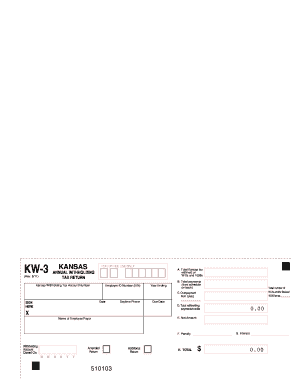
Lect Kansas withholding. You must complete the appropriate filing period schedule of payment on the back of Form KW-3 and enter the total number of W-2 forms and/or applicable federal 1099 forms enclosed with Form KW-3. LINE B: Enter the total amount of Kansas withholding tax paid during the calendar year from the completed schedule on the back of Form KW-3. LINE C: Enter the amount of any credit memo(s) received as a result of an overpayment from the previous year and used as credit this calend.

How it works

  1. Open form

    Open form follow the instructions

  2. Easily sign form

    Easily sign the form with your finger

  3. Share form

    Send filled & signed form or save

How to fill out the KS DoR KW-3 online

Filling out the KS DoR KW-3 form is an important task for employers who need to report Kansas withholding tax. This guide will provide detailed and user-friendly instructions on how to complete the form online, ensuring that you understand every section and field.

Follow the steps to successfully complete your KS DoR KW-3 form.

  1. Press the ‘Get Form’ button to obtain the KW-3 form and display it in your online editor.
  2. Enter your Kansas withholding tax account number at the top of the form. If you do not have one, you will need to register for it before proceeding.
  3. Fill in your Employer Identification Number (EIN) accurately. Ensure this number is up-to-date and matches the information on your W-2 and 1099 forms.
  4. Provide the date for the tax return and specify the year ending for which you are filing.
  5. In Line A, enter the total Kansas income tax withheld from employees/payees as shown on the accompanying W-2 and 1099 forms.
  6. Complete the appropriate filing period schedule on the back of the form by entering the amount of Kansas withholding tax paid for each applicable period.
  7. In Line B, total the payments from the schedule on the back and enter it on the front of the KW-3.
  8. If you have received any overpayment credits from the previous year, enter that amount in Line C.
  9. Add the amounts in Lines B and C and input the total on Line D. This represents total payments and/or credits for the current tax year.
  10. Compare the amounts in Lines A and D. If they differ, indicate the amount of the underpayment or overpayment in Line E.
  11. Fill out Lines F and G if applicable, to record any penalties or interest due on underpayment after the filing due date.
  12. Lastly, add the amounts in Lines E, F, and G and enter the total on Line H. If you have an underpayment, include remittance with your form.
  13. Sign and date the form. After completing all sections, save your changes, and prepare to download, print, or share the completed KW-3 form as needed.

Ensure compliance by completing your KS DoR KW-3 form online today!

Get form

Experience a faster way to fill out and sign forms on the web. Access the most extensive library of templates available.
Get form

Related content

Annual Withholding Tax Return (KW-3)
Enter your federal EIN in the space provided. Due date is January 31st day. You must file...
Learn more
Kansas Payroll Tax Setup
A Kansas KW-3 Annual Withholding Tax Return must be filed electronically along with the...
Learn more
Manual DR-MH30_port_brochura.p65
Dec 26, 2002 — Nota para o instalador do sistema de TV a Cabo. Esse lembrete é...
Learn more

Related links form

FL Motion to Modify or Terminate Probation or Community Control FL Motion to Terminate Child Support and Vacate Income Deduction Order 2006 FL No. SC09-250 2010 FL Notaries in Special Positions

Questions & Answers

Get answers to your most pressing questions about US Legal Forms API.

Contact support

KW County, more commonly referred to as Kansas City, represents a significant urban area in the state. It encompasses both the city and the surrounding areas that may have specific tax obligations and benefits. Understanding the nuances of local taxes can be complex, but the KS DoR KW-3 form will ensure that residents are aligned with state tax requirements. If you need assistance navigating taxation in this area, platforms like uslegalforms can provide valuable resources.

You may be exempt from Kansas withholding if your income is below the minimum threshold or if you qualify for certain exemptions such as being a full-time student or having low income. It is crucial to complete and submit the appropriate forms to your employer to ensure they do not withhold state taxes incorrectly. Understanding the KS DoR KW-3 can also help you determine your withholding status yearly.

Form KW-3 is the Kansas Employer's Withholding Tax Annual Reconciliation Form. Employers use this form to report the total amount of state income tax withheld from employees throughout the year. It serves as a summary of individual employee forms and is critical for ensuring that withholding amounts align with the state’s tax regulations. Employers must submit the KS DoR KW-3 form to the Kansas Department of Revenue by specified deadlines.

In Kansas, your paycheck typically has several taxes deducted, including federal income tax, Social Security, Medicare, and Kansas state income tax. Additionally, if you're an employee in specific cities, local taxes may also apply. The information on your KS DoR KW-3 form can provide insights into the amount withheld for Kansas state income tax specifically.

To file for a Kansas City earnings tax refund, you should collect your tax withholding information, including the KS DoR KW-3 form to verify the amount withheld. You can submit your refund request through the Kansas City Finance Department's website or by mail. Ensure you have all necessary documents ready to streamline the process, making it easier to receive your refund promptly.

Yes, Kansas requires the filing of 1099 forms for reporting income earned by individuals who are not considered employees. If you make payments to independent contractors or other entities that meet certain thresholds, you must issue a 1099 form. Filing these forms accurately helps ensure compliance with state tax requirements, and the KS DoR KW-3 form is vital for reconciling with any taxes withheld.

3 in Kansas is a summary form that employers use to report the total withholding tax information for employees. Specifically, it details the total amounts withheld from employee wages for state income taxes. This form is filed with the Kansas Department of Revenue, which helps keep track of tax obligations. Understanding the KS DoR KW3 form is essential for both employers and employees to ensure compliance with Kansas tax laws.

In Kansas, the minimum income required to file taxes depends on your filing status and age. Generally, if your income exceeds a certain threshold, you must file a tax return. It's a good practice to check with the Kansas Department of Revenue for the latest figures and ensure you're compliant while completing your KS DoR KW-3.

Certain individuals may be exempt from Kansas income tax, including those with very low income, some retirement income, and certain veterans' benefits. It's essential to review the specific criteria set forth by the Kansas Department of Revenue to confirm your exemption status. Keep this in mind when preparing the KS DoR KW-3.

Saying you are not subject to withholding means that your income does not require state income tax to be withheld. This situation often applies to individuals with no tax liability or very specific exemptions. Understanding your status is key when filling out the KS DoR KW-3, as it impacts how you report your income.

Get This Form Now!

Use professional pre-built templates to fill in and sign documents online faster. Get access to thousands of forms.
Get form
If you believe that this page should be taken down, please follow our DMCA take down processhere.
Get KS DoR KW-3
Get form
  • Adoption
  • Bankruptcy
  • Contractors
  • Divorce
  • Home Sales
  • Employment
  • Identity Theft
  • Incorporation
  • Landlord Tenant
  • Living Trust
  • Name Change
  • Personal Planning
  • Small Business
  • Wills & Estates
  • Packages A-Z
  • Affidavits
  • Bankruptcy
  • Bill of Sale
  • Corporate - LLC
  • Divorce
  • Employment
  • Identity Theft
  • Internet Technology
  • Landlord Tenant
  • Living Wills
  • Name Change
  • Power of Attorney
  • Real Estate
  • Small Estates
  • Wills
  • All Forms
  • Forms A-Z
  • Other Templates
  • Legal Hub
  • About Us
  • Help Portal
  • Legal Resources
  • Blog
  • Affiliates
  • Contact Us
  • Delete My Account
  • Site Map
  • Industries
  • Forms in Spanish
  • Localized Forms
  • State-specific Forms
  • Forms Kit
  • Real Estate Handbook
  • All Guides
  • Notarize
  • Incorporation services
  • For Consumers
  • For Small Business
  • For Attorneys
  • USLegal
  • FormsPass
  • pdfFiller
  • signNow
  • altaFlow
  • DocHub
  • Instapage
Form Packages
  • Adoption
  • Bankruptcy
  • Contractors
  • Divorce
  • Home Sales
  • Employment
  • Identity Theft
  • Incorporation
  • Landlord Tenant
  • Living Trust
  • Name Change
  • Personal Planning
  • Small Business
  • Wills & Estates
  • Packages A-Z
Form Categories
  • Affidavits
  • Bankruptcy
  • Bill of Sale
  • Corporate - LLC
  • Divorce
  • Employment
  • Identity Theft
  • Internet Technology
  • Landlord Tenant
  • Living Wills
  • Name Change
  • Power of Attorney
  • Real Estate
  • Small Estates
  • Wills
  • All Forms
  • Forms A-Z
  • Other Templates
Customer Service
  • Legal Hub
  • About Us
  • Help Portal
  • Legal Resources
  • Blog
  • Affiliates
  • Contact Us
  • Delete My Account
  • Site Map
  • Industries
  • Forms in Spanish
  • Localized Forms
  • State-specific Forms
  • Forms Kit
Legal Guides
  • Real Estate Handbook
  • All Guides
Prepared for you
  • Notarize
  • Incorporation services
Our Customers
  • For Consumers
  • For Small Business
  • For Attorneys
Our Sites
  • USLegal
  • FormsPass
  • pdfFiller
  • signNow
  • altaFlow
  • DocHub
  • Instapage
Social Media
Call us now toll free:
+1 833 426 79 33
As seen in:
© Copyright 1999-2026 airSlate Legal Forms, Inc. 17 Station Street, Ste. 203, Brookline, MA 02445
  • Your Privacy Choices
  • Terms of Service
  • Privacy Notice
  • Content Takedown Policy
  • Bug Bounty Program