Loading
Form preview
  • US Legal Forms
  • Other Templates
  • Tax Forms
  • Kansas Tax Forms
  • Ks Dor K-41 2013

Get Ks Dor K-41 2013

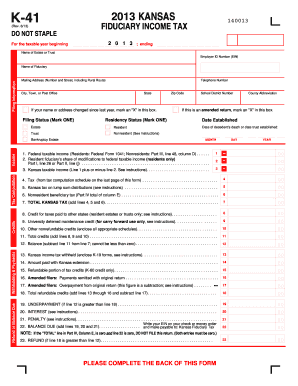
Te or Trust Employer ID Number (EIN) Filing Information Name of Fiduciary Mailing Address (Number and Street, including Rural Route) Telephone Number City, Town, or Post Office State If your name or address changed since last year, mark an "X" in this box. Filing Status (Mark ONE) Residency Status (Mark ONE) Income School District Number County Abbreviation If this is an amended return, mark an "X" in this box. Date Established Estate Resident Date of decedent's death or date.

How it works

  1. Open form

    Open form follow the instructions

  2. Easily sign form

    Easily sign the form with your finger

  3. Share form

    Send filled & signed form or save

How to fill out the KS DoR K-41 online

Filling out the KS DoR K-41 fiduciary income tax form online is a crucial step for estates and trusts in Kansas. This guide provides a clear, step-by-step approach to assist users in completing the form accurately.

Follow the steps to fill out the KS DoR K-41 online.

  1. Press the 'Get Form' button to access the KS DoR K-41 and open it in your preferred online editor.
  2. Begin by entering the taxable year at the top of the form. Fill in the beginning and ending dates as applicable.
  3. Provide the name of the estate or trust and the Employer Identification Number (EIN) in the designated fields.
  4. Input the name of the fiduciary and their mailing address, including the telephone number and city.
  5. If there have been any changes to the name or address since the last filing, indicate this by marking an 'X' in the provided box.
  6. Select the appropriate filing status by marking one box—ensure that you choose the correct residency status as well.
  7. For the income section, fill out the federal taxable income in line 1 based on the Federal Form 1041 data.
  8. Complete the additional modification fields as necessary. Subtract or add any modifications to arrive at the Kansas taxable income on line 3.
  9. Continue filling out the tax calculations, following the instructions closely to determine the total Kansas tax as shown on line 7.
  10. Review the credits available and fill out corresponding lines for any taxes paid to other states, or other applicable credits.
  11. Finalize the form by reviewing all sections filled out, ensuring accuracy, and then save, download, or print your completed K-41 form.

Complete your KS DoR K-41 online today to ensure timely and accurate filing.

Get form

Experience a faster way to fill out and sign forms on the web. Access the most extensive library of templates available.

Related content

K-41 Fiduciary Income Tax Return Rev. 7-23
Kansas income tax withheld. 13. Kansas estimated tax paid. 14. Amount paid with Kansas...
Learn more
Forms and Publications - Personal Taxation
Request For Copy Of Kansas Tax Records (DO-41) · Sales and Use Tax Refund ... Sales and...
Learn more
stihl km 55 r
Wrong fuel mix (too much engine oil in the gasoline), a dirty air filter and unfavorable...
Learn more

Related links form

FL Instructions for Levy 2014 FL Juror Excusal Request FL Juror Excusal Request - Santa Rosa County FL Juror Excuse Statement 2012

Questions & Answers

Get answers to your most pressing questions about US Legal Forms API.

Contact support

Yes, you can eFile a Kansas amended return using the appropriate strategies and forms, including the KS DoR K-41. This option allows you to amend your tax information smoothly, often resulting in a quicker turnaround for any adjustments. Just make sure all necessary information is accurate and complete before submitting your amended return electronically. This will help streamline the amendment process.

In Kansas, LLCs are typically taxed as pass-through entities, meaning the income is taxed only at the individual level, rather than at the business level. This approach allows the income to flow through to the owners' personal tax returns. The KS DoR K-41 will be useful for reporting any income derived from your LLC activities. Understanding this tax structure can help you plan your finances effectively.

Absolutely, amended returns can be filed electronically in Kansas to make the process more efficient. You would generally use the KS DoR K-41 to handle your amended filing. This electronic option can reduce processing times and help ensure accuracy. Always check the latest guidelines to confirm that you're following the right procedures when filing amendments.

Establishing an LLC in Kansas offers several advantages, such as limited liability protection for its owners and flexibility in management. Additionally, an LLC may benefit from pass-through taxation, which means profits are taxed only at the personal level, avoiding double taxation. The KS DoR K-41 might also be relevant for reporting income generated by your LLC. This structure can help business owners protect personal assets while simplifying tax obligations.

Yes, Kansas allows taxpayers to file amended returns electronically using the appropriate forms, including the KS DoR K-41 for adjustments. This option offers convenience and reduces the chances of errors during submission. Just ensure you have the updated information ready when completing your amended return. It can save time and streamline your filing experience.

Yes, Kansas provides an eFile option for various tax forms, including the KS DoR K-41. This method simplifies the process and can help you submit your returns more efficiently. By using eFile, you can often receive quicker processing and faster refunds. Make sure to gather all your necessary documentation before starting the eFile process.

Yes, you are required to file Kansas City returns if you earn income in the city. The KS DoR K-41 form is specifically designed for residents and businesses to report their income accurately. Please check the specific requirements based on your situation before filing. Consulting a tax professional can also help clarify your obligations.

You can pick up Kansas tax forms at local Department of Revenue offices or access them online. The Kansas Department of Revenue website provides a comprehensive collection of forms, including those related to KS DoR K-41. If you prefer a physical format, visiting a local office may be beneficial for assistance and picking up any printed materials.

To obtain your K-1 form, contact the partnership or S corporation with which you hold an investment. They are required to send it to you annually, usually by the tax filing deadline. If you are unable to receive it in time, it is wise to request it via email or phone. For more info regarding tax filings and the importance of the K-1, explore KS DoR K-41 resources.

To track your Kansas State refund, use the online tracking tool provided by the Kansas Department of Revenue. By entering your information, you can see the status of your refund. Additionally, ensure that your tax filings were completed accurately to avoid any delays. For information on how to file correctly, refer to KS DoR K-41.

Get This Form Now!

Use professional pre-built templates to fill in and sign documents online faster. Get access to thousands of forms.
If you believe that this page should be taken down, please follow our DMCA take down processhere.
Get KS DoR K-41
  • Adoption
  • Bankruptcy
  • Contractors
  • Divorce
  • Home Sales
  • Employment
  • Identity Theft
  • Incorporation
  • Landlord Tenant
  • Living Trust
  • Name Change
  • Personal Planning
  • Small Business
  • Wills & Estates
  • Packages A-Z
  • Affidavits
  • Bankruptcy
  • Bill of Sale
  • Corporate - LLC
  • Divorce
  • Employment
  • Identity Theft
  • Internet Technology
  • Landlord Tenant
  • Living Wills
  • Name Change
  • Power of Attorney
  • Real Estate
  • Small Estates
  • Wills
  • All Forms
  • Forms A-Z
  • Other Templates
  • Legal Hub
  • About Us
  • Help Portal
  • Legal Resources
  • Blog
  • Affiliates
  • Contact Us
  • Delete My Account
  • Site Map
  • Industries
  • Forms in Spanish
  • Localized Forms
  • State-specific Forms
  • Forms Kit
  • Real Estate Handbook
  • All Guides
  • Notarize
  • Incorporation services
  • For Consumers
  • For Small Business
  • For Attorneys
  • USLegal
  • FormsPass
  • pdfFiller
  • signNow
  • altaFlow
  • DocHub
  • Instapage
Form Packages
  • Adoption
  • Bankruptcy
  • Contractors
  • Divorce
  • Home Sales
  • Employment
  • Identity Theft
  • Incorporation
  • Landlord Tenant
  • Living Trust
  • Name Change
  • Personal Planning
  • Small Business
  • Wills & Estates
  • Packages A-Z
Form Categories
  • Affidavits
  • Bankruptcy
  • Bill of Sale
  • Corporate - LLC
  • Divorce
  • Employment
  • Identity Theft
  • Internet Technology
  • Landlord Tenant
  • Living Wills
  • Name Change
  • Power of Attorney
  • Real Estate
  • Small Estates
  • Wills
  • All Forms
  • Forms A-Z
  • Other Templates
Customer Service
  • Legal Hub
  • About Us
  • Help Portal
  • Legal Resources
  • Blog
  • Affiliates
  • Contact Us
  • Delete My Account
  • Site Map
  • Industries
  • Forms in Spanish
  • Localized Forms
  • State-specific Forms
  • Forms Kit
Legal Guides
  • Real Estate Handbook
  • All Guides
Prepared for you
  • Notarize
  • Incorporation services
Our Customers
  • For Consumers
  • For Small Business
  • For Attorneys
Our Sites
  • USLegal
  • FormsPass
  • pdfFiller
  • signNow
  • altaFlow
  • DocHub
  • Instapage
Social Media
Call us now toll free:
+1 833 426 79 33
As seen in:
© Copyright 1999-2026 airSlate Legal Forms, Inc. 17 Station Street, Ste. 203, Brookline, MA 02445
  • Your Privacy Choices
  • Terms of Service
  • Privacy Notice
  • Content Takedown Policy
  • Bug Bounty Program
KS DoR K-41
This form is available in several versions.
Select the version you need from the drop-down list below.
2021 KS DoR K-41
Select form
  • 2021 KS DoR K-41
  • 2020 KS DoR K-41
  • 2019 KS DoR K-41
  • 2018 KS DoR K-41
  • 2014 KS DoR K-41
  • 2013 KS DoR K-41
  • 2011 KS DoR K-41
Select form