Loading
Get Ks Dor K-41 2018
How it works
-

Open form follow the instructions
-

Easily sign the form with your finger
-

Send filled & signed form or save
How to fill out the KS DoR K-41 online
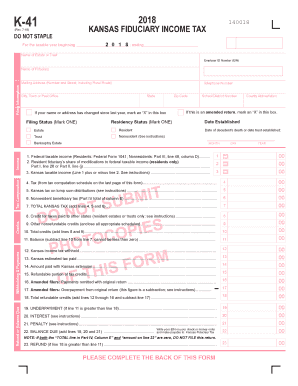
The KS DoR K-41 form is essential for reporting fiduciary income tax for estates and trusts in Kansas. This guide provides clear, step-by-step instructions on how to complete this form effectively online.
Follow the steps to successfully fill out the KS DoR K-41 form online.
- Click the 'Get Form' button to access the KS DoR K-41 form and open it in your preferred document editor.
- Begin filling in the necessary details, starting with the taxable year by entering the beginning and ending dates in the specified fields.
- Enter the name of the estate or trust along with the Employer Identification Number (EIN) in the designated sections.
- Complete the fiduciary's name and contact information, including the mailing address and telephone number.
- Indicate if there has been a change in your name or address since last year by marking the appropriate checkbox.
- Select your residency status by marking either the 'Resident' or 'Nonresident' option.
- Choose your filing status by selecting either 'Estate' or 'Trust' as required.
- If applicable, indicate if this is an amended return by checking the provided box.
- Proceed to fill in the income and tax computation sections, carefully entering the federal taxable income and any modifications applicable.
- Continue through the form, filling in required sections such as credits, withholdings, and any other relevant tax information.
- Once all sections are complete, ensure that you review your entries for accuracy.
- Finalize the process by saving your changes, and then choose whether to download, print, or share the completed KS DoR K-41 form.
Complete your KS DoR K-41 form online today for efficient filing and compliance with Kansas fiduciary income tax regulations.
Get form
Experience a faster way to fill out and sign forms on the web. Access the most extensive library of templates available.
You can acquire Kansas tax forms at various locations, including local libraries and tax offices. Additionally, the Kansas Department of Revenue's website offers downloadable versions of these forms. For detailed guidance, refer to the KS DoR K-41 to ensure you have the right forms for your needs.
Get This Form Now!
Use professional pre-built templates to fill in and sign documents online faster. Get access to thousands of forms.