Loading
Get Ks Dor K-40 2013
How it works
-

Open form follow the instructions
-

Easily sign the form with your finger
-

Send filled & signed form or save
How to fill out the KS DoR K-40 online
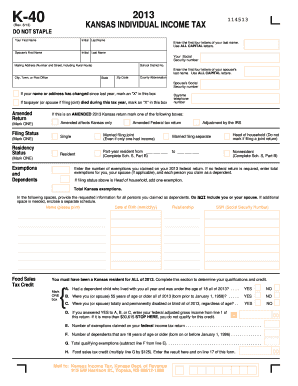
Filling out the Kansas DoR K-40 form online requires careful attention to detail. This guide will provide you with the necessary steps and information to complete your individual income tax return efficiently and accurately.
Follow the steps to complete the KS DoR K-40 online.
- Click 'Get Form' button to obtain the KS DoR K-40 form and access it in your preferred digital format.
- Enter your first name, middle initial, and last name in the designated fields. Make sure to use all capital letters for the first four letters of your last name.
- Input your Social Security number in the specified field. Be sure to double-check for accuracy.
- Fill in your mailing address, including the street number and name, city, state, zip code, and county abbreviation, ensuring all information is correct.
- If your name or address has changed since last year, mark the corresponding box. Also, indicate if the taxpayer or spouse passed away during the tax year by marking the appropriate box.
- Select your filing status by checking the applicable box: single, married filing joint, married filing separate, or head of household.
- Indicate your residency status by checking the appropriate box for resident, part-year resident, or nonresident.
- Enter the number of exemptions claimed on your federal return in the given field and provide details for any dependents you are claiming, including their names, dates of birth, relationships to you, and Social Security numbers.
- Complete the Food Sales Tax Credit section if applicable by answering the qualifying questions about dependents, age, and disability status. Enter your federal adjusted gross income if you qualify.
- Continue to fill out the income section by entering your federal adjusted gross income, modifications, and Kansas adjusted gross income as required.
- Provide your deductions, whether standard or itemized, and report your exemption allowance. Ensure to calculate your total deductions accurately.
- Calculate your taxable income by subtracting total deductions from your Kansas adjusted gross income.
- Determine your tax using the tax tables or computation schedule, and complete the credits section, including any earned income credit or other credits.
- Review the balance due section to determine any amounts owed or refunds due based on the calculations previously entered.
- Initiate the signature process by entering the taxpayer’s signature, and if applicable, the spouse’s signature. Ensure to date the form.
- Finally, save your changes, download the completed form, or choose to print or share it as necessary.
Take the next step and complete your KS DoR K-40 form online today!
Get form
Experience a faster way to fill out and sign forms on the web. Access the most extensive library of templates available.
Yes, you can obtain your K-1 online through your tax software or the platform used for filing your taxes. If your K-1 is related to the KS DoR K-40, make sure your records are in order to ensure a smooth retrieval process. Online platforms, like USLegalForms, can provide additional resources if you encounter any difficulties.
Get This Form Now!
Use professional pre-built templates to fill in and sign documents online faster. Get access to thousands of forms.