Loading
Get Ks Dor K-40 2018
How it works
-

Open form follow the instructions
-

Easily sign the form with your finger
-

Send filled & signed form or save
How to fill out the KS DoR K-40 online
The KS DoR K-40 form is essential for individuals filing their Kansas income tax returns. This guide will provide you with clear and detailed steps on how to fill out this form online, ensuring that you complete it accurately and efficiently.
Follow the steps to fill out the KS DoR K-40 form online
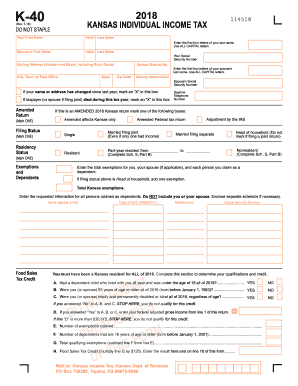
- Click the ‘Get Form’ button to obtain the KS DoR K-40 form and open it in the online editor.
- Begin by entering your first and last name along with your Social Security number. Ensure that the last name is entered in all capital letters.
- Provide your mailing address, including city, state, zip code, and county abbreviation. If your information has changed since the previous year, mark the appropriate box.
- Indicate your filing status by selecting one of the options provided: single, married filing jointly, married filing separately, head of household, resident, or nonresident. Make sure to fill in any relevant details such as your spouse's information if applicable.
- Enter the total number of exemptions you are claiming, including those for yourself, your spouse (if applicable), and each dependent. Be sure to include necessary details for each dependent.
- Complete the section for the food sales tax credit by answering the qualification questions. If you qualify based on the criteria, enter your federal adjusted gross income as specified.
- Report your federal adjusted gross income, modifications, and Kansas adjusted gross income accurately on the specified lines of the form.
- Calculate your deductions, including standard or itemized deductions, and compute the total deductions.
- Determine your taxable income by subtracting total deductions from your Kansas adjusted gross income.
- Follow the instructions to calculate your tax due, nonresident tax if applicable, and list any credits you are claiming.
- Finalize your tax balance calculations, determining any amount due or refund expected.
- Before submitting, review your entries for accuracy. Save the completed form, then choose to download, print, or share it as necessary.
Start filling out the KS DoR K-40 form online today to ensure timely submission of your tax return.
Get form
Experience a faster way to fill out and sign forms on the web. Access the most extensive library of templates available.
Tracking your Kansas State refund is manageable through the Kansas Department of Revenue website. You simply need to input your details, and you can see the status of your refund. It's important to keep your KS DoR K-40 information handy, as inaccuracies can delay processing. Following these steps will help you stay updated on your refund.
Get This Form Now!
Use professional pre-built templates to fill in and sign documents online faster. Get access to thousands of forms.