Loading
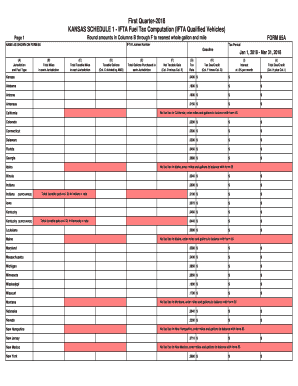
Get Ks 85a 2018
How it works
-

Open form follow the instructions
-

Easily sign the form with your finger
-

Send filled & signed form or save
How to fill out the KS 85A online
Filling out the KS 85A form online can streamline your fuel tax computation process for IFTA qualified vehicles. This guide provides step-by-step instructions to help you complete the form accurately and efficiently.
Follow the steps to fill out the KS 85A form online.
- Click ‘Get Form’ button to obtain the form and open it in the editor.
- Enter your IFTA license number in the designated field. This number is essential for identifying your account.
- Input the name as shown on Form 85 in the appropriate section. Make sure the name matches the records to avoid discrepancies.
- Select the tax period for which you are filing, specifically from January 1, 2018, to March 31, 2018.
- For each jurisdiction, fill in the gasoline type in Column A, then enter the total miles traveled in Column B.
- Next, record the total taxable miles in Column C for each jurisdiction based on your records.
- Calculate the taxable gallons for each jurisdiction and enter these values in Column D by dividing the number from Column C by AMG.
- Fill in the total gallons purchased in each jurisdiction in Column E.
- Determine the net taxable gallons by subtracting the values in Column E from Column D and enter them in Column F.
- Record the tax rate for each jurisdiction in Column G as provided in the document.
- Calculate the tax due or credit in Column H by multiplying the values in Column F by the respective tax rate.
- If applicable, compute the interest at 0.5% per month in Column I based on the tax due.
- Finally, calculate the total due or credit by adding the values in Column H and Column I, then enter this in Column J.
- After reviewing all entries for accuracy, save the changes, and then download, print, or share the completed KS 85A form as needed.
Start completing your documents online today for a smoother filing experience.
Get form
Experience a faster way to fill out and sign forms on the web. Access the most extensive library of templates available.
Related links form
When filling out a tax amendment form, start by specifying the original tax year you are amending. Provide all relevant information that needs to be corrected and explain the reason for the amendment. Accurate reporting and reference to KS 85A guidelines will ensure that your amendment is processed without delay.
Get This Form Now!
Use professional pre-built templates to fill in and sign documents online faster. Get access to thousands of forms.