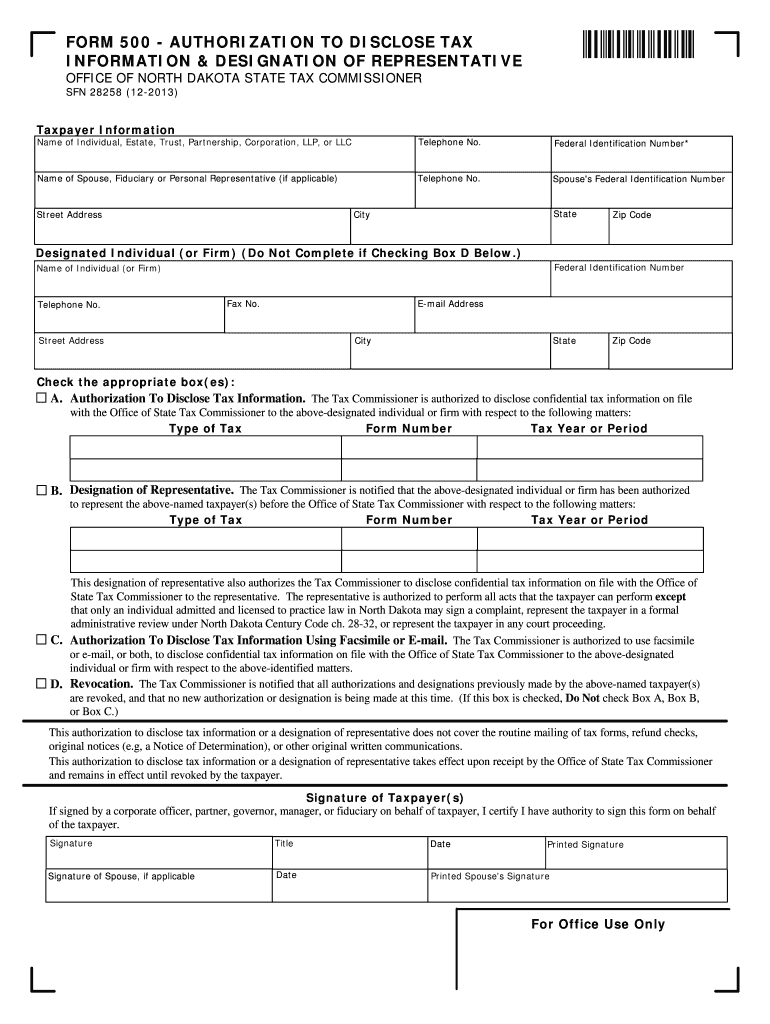
Te, Trust, Partnership, Corporation, LLP, or LLC Telephone No. Federal Identification Number* Name of Spouse, Fiduciary or Personal Representative (if applicable) Telephone No. Spouse's Federal Identification Number State City Street Address Zip Code Designated Individual (or Firm) (Do Not Complete if Checking Box D Below.) Federal Identification Number Name of Individual (or Firm) Telephone No. Fax No. E-mail Address Street Address City State Zip Code Check the appropriate bo.

Open form follow the instructions

Easily sign the form with your finger

Send filled & signed form or save
How to fill out the ND SFN 28258 online
The ND SFN 28258, also known as Form 500, is an essential document for taxpayers who need to authorize the disclosure of tax information or designate a representative. This guide provides step-by-step instructions to assist users in completing this form online effectively.
Follow the steps to fill out the ND SFN 28258 online.
- Press the ‘Get Form’ button to obtain the form and open it in the editor.
- In the 'Taxpayer Information' section, enter the name of the individual, estate, trust, partnership, corporation, LLP, or LLC. Include the telephone number and federal identification number where applicable.
- If applicable, fill in the name and telephone number of the spouse, fiduciary, or personal representative, along with their federal identification number and mailing address.
- In the 'Designated Individual (or Firm)' section, provide the name, title, and contact information of the individual or firm you wish to designate. If you want to receive disclosures via facsimile or email, enter the relevant contact details and check Box C.
- Decide which box to check for authorization: Box A to disclose tax information, Box B to designate a representative, Box C to authorize disclosures using electronic means, or Box D to revoke previous authorizations.
- Specify the type of tax, form number, and tax year or period. If necessary, attach an additional sheet for more details.
- Sign the form. Ensure that the appropriate individual signs — this could be a general partner, officer, manager, or fiduciary, depending on the entity type.
- If applicable, have the spouse sign and print their name.
- Review all entered information for accuracy, save any changes, and prepare to submit the form to the Office of State Tax Commissioner.
Complete your ND SFN 28258 online today to ensure timely and accurate processing of your tax information.
Experience a faster way to fill out and sign forms on the web. Access the most extensive library of templates available.
Related content
AUTHORIZATION TO DISCLOSE TAX INFORMATION. & DESIGNATION OF REPRESENTATIVE. OFFICE OF...
the 23135932950 1 of 13151960974 2 and 12997686891 3 to 12137015015 4 a ... 28256 rojo...
Use professional pre-built templates to fill in and sign documents online faster. Get access to thousands of forms.
If you believe that this page should be taken down, please follow our DMCA take down process here.
This form is available in several versions. Select the version you need from the drop-down list below.