Loading
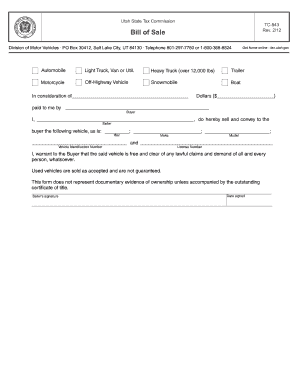
Get Ut Tc-843 2012
How it works
-

Open form follow the instructions
-

Easily sign the form with your finger
-

Send filled & signed form or save
How to fill out the UT TC-843 online
Filling out the UT TC-843, the bill of sale form for vehicle transactions in Utah, is an essential task for anyone involved in the buying or selling of a vehicle. This guide will provide clear, step-by-step instructions to help you accurately complete the form online.
Follow the steps to effectively complete your UT TC-843 form.
- Click the ‘Get Form’ button to access the form and open it for editing.
- In the first section, enter the total consideration amount received for the vehicle in the blank space next to 'Dollars ($)'.
- Fill in the buyer's information in the space labeled 'Buyer' with the name of the individual or entity purchasing the vehicle.
- In the section labeled 'Seller', provide your name as the person selling the vehicle.
- Complete the vehicle description fields by entering the year, make, and model of the vehicle in the respective blanks.
- Input the Vehicle Identification Number (VIN) to uniquely identify the vehicle. Additionally, provide the license number in the specified area.
- Review the warranty statement confirming that the vehicle is free from legal claims and is sold 'as is.'
- Affix your signature in the designated 'Seller's signature' area and enter the date you are signing the form.
- After reviewing all entries for accuracy, you can choose to save any changes, download the completed form, print it, or share it as needed.
Complete your documents online efficiently and securely.
Get form
Experience a faster way to fill out and sign forms on the web. Access the most extensive library of templates available.
Get This Form Now!
Use professional pre-built templates to fill in and sign documents online faster. Get access to thousands of forms.