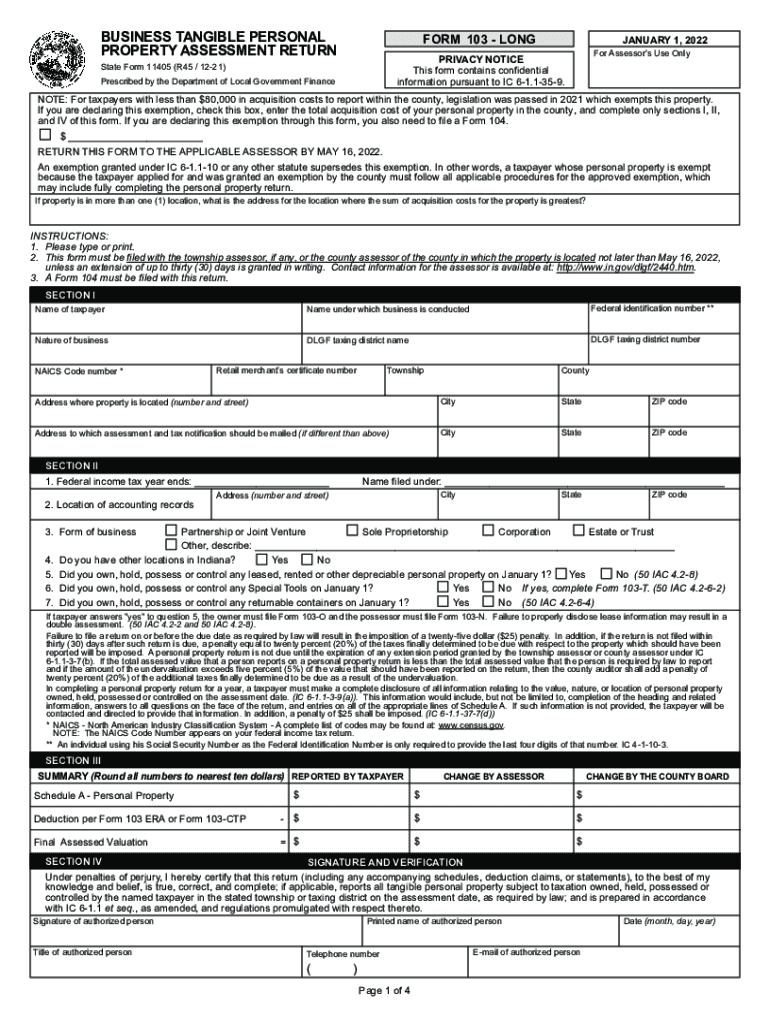
Reset Agribusiness TANGIBLE PERSONAL PROPERTY ASSESSMENT RETURNER 103 LONGJANUARY 1, 2022 For Assessor's Use OnlyPRIVACY NOTICE This form contains confidential information pursuant to IC 61.1359.
Loading

Open form follow the instructions

Easily sign the form with your finger

Send filled & signed form or save
How to fill out the IN SF 11405 online
Completing the IN SF 11405 form is essential for businesses looking to file their personal property tax returns accurately. This guide provides step-by-step instructions to help users successfully fill out the form online, ensuring they meet regulatory requirements without confusion.
Follow the steps to complete the IN SF 11405 online effectively.
- Press the ‘Get Form’ button to access the form and open it in your online editor.
- Carefully fill out Section I, starting with the name of the taxpayer and the name under which the business is conducted. Enter the federal identification number, nature of the business, and applicable county and township details.
- In Section II, specify the federal income tax year end date and the location of accounting records. Indicate the type of business structure and whether you own property at other locations in Indiana, as well as any depreciable personal property owned on January 1.
- Proceed to Section III to provide a summary of the personal property, including reported values and any deductions based on your claims, ensuring to round numbers to the nearest ten dollars.
- Complete Section IV by signing and verifying the information provided on the form. Make sure to include the printed name, title, contact number, email, and date.
- Finalize by reviewing all sections to ensure accuracy, and then proceed to save your changes, download the completed form, or print and share it according to your needs.
Begin filling out the IN SF 11405 online today to ensure timely and accurate submission.
Experience a faster way to fill out and sign forms on the web. Access the most extensive library of templates available.
Related content
... tax information. Find properties near 11405 Artesia Blvd. ... 3,600 SF. Retail. 17104...
(SF 11405). Form 103-CTP Schedule of Deduction from Assessed Valuation Personal Property...
3 002-11405-007 *Center Shaft; Pressure. 1 ... 9 014-11405-008 *De-electricity Brush; A3...
Use professional pre-built templates to fill in and sign documents online faster. Get access to thousands of forms.
If you believe that this page should be taken down, please follow our DMCA take down process here.
This form is available in several versions. Select the version you need from the drop-down list below.