Loading
Get Ut Tc-810 2021-2026
How it works
-

Open form follow the instructions
-

Easily sign the form with your finger
-

Send filled & signed form or save
How to fill out the UT TC-810 online
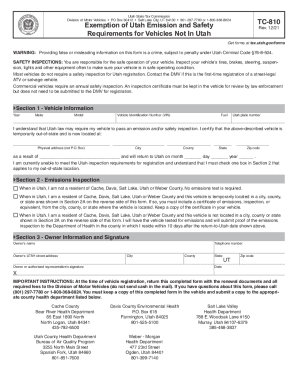
Filling out the UT TC-810 form is a crucial step for those who need to exempt their vehicle from Utah emissions and safety requirements while it is out-of-state. This guide offers clear, step-by-step instructions to help users complete the form accurately.
Follow the steps to complete the UT TC-810 form online.
- Press the ‘Get Form’ button to access the UT TC-810 form and open it in your preferred editor.
- Begin with Section 1, where you will provide Vehicle Information. Enter the year, make, model, Vehicle Identification Number (VIN), fuel type, and Utah plate number of your vehicle.
- In Section 1, certify that your vehicle is temporarily out-of-state by entering the physical address where it is located, along with the city, county, state, and zip code. Explain the reason for being out-of-state and indicate the anticipated return date.
- Move to Section 2, which relates to the Emissions Inspection. Check the appropriate box that corresponds to your residential county and location status while out-of-state. Be sure to include any necessary documentation based on your choice.
- Proceed to Section 3 to enter the Owner Information. Fill in the owner's name, telephone number, and Utah street address, along with city, county, state, and zip code.
- After completing Section 3, ensure that the owner or an authorized representative signs and dates the form in the designated area.
- Finally, save your completed form. You can also choose to download, print, or share it as needed. Ensure that a copy is kept in the vehicle and submitted to the appropriate county health department.
Complete your documents online today to ensure compliance and a smooth registration process.
Related links form
Emissions Requirements. Vehicles registered in Utah County with model years less than six years old are required to have an emission test once every two years.