Loading
Get La It-540 2021
How it works
-

Open form follow the instructions
-

Easily sign the form with your finger
-

Send filled & signed form or save
How to fill out the LA IT-540 online
Filling out the LA IT-540 online is an essential step for Louisiana residents wanting to file their income tax return accurately and efficiently. This guide provides a comprehensive walkthrough of each section to help you navigate the process with confidence.
Follow the steps to fill out the LA IT-540 accurately.
- Use the ‘Get Form’ button to acquire the LA IT-540 form and open it in your preferred PDF editor.
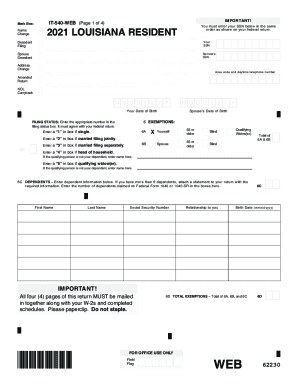
- Begin filling out your personal information. Enter your legal first name, middle initial, last name, and suffix if applicable. If you are filing jointly, provide your spouse’s information.
- Include your home address. Make sure to provide the complete street address, unit type, city, state, and ZIP code.
- List your Social Security Number (SSN) as well as your spouse's SSN if filing jointly. Additionally, you will need to provide your date of birth and your spouse's date of birth.
- Indicate your filing status by entering the correct number in the filing status box. You may choose from single, married filing jointly, married filing separately, head of household, or qualifying widow(er).
- Fill in the exemptions section by providing information about yourself, your spouse, and any dependents you are claiming.
- Proceed to enter your Federal Adjusted Gross Income. Remember that if your income is less than zero, you should input '0'.
- Input your deductions based on whether you itemized or took the standard deductions on your federal return.
- Calculate your Louisiana tax liability using the income tax table provided in the form instructions, based on your filing status.
- Complete the credits section by inputting any refundable credits you qualify for, based on schedules that are relevant to your situation.
- If applicable, indicate any donations to specific programs, which can affect your taxable income or potential refund.
- Finalize your return by reviewing all entries to ensure accuracy. You can then save your changes, download the completed form, print it, or share it as needed.
Start filling out your documents online today for a hassle-free filing experience.
Get form
Experience a faster way to fill out and sign forms on the web. Access the most extensive library of templates available.
Once you have filed, you can check the status of your refund using the following methods: Visit Where's My Refund? at www.revenue.louisiana.gov/refund. Submit an Individual Refund Status email inquiry. Call 888-829-3071.
Get This Form Now!
Use professional pre-built templates to fill in and sign documents online faster. Get access to thousands of forms.