How it works
  • Open form

    Open form follow the instructions

  • Easily sign form

    Easily sign the form with your finger

  • Share form

    Send filled & signed form or save

How to fill out the WV Schedule M IT-140 online

Filling out the WV Schedule M IT-140 online is essential for accurately reporting modifications to your adjusted gross income. This guide provides clear and supportive instructions to help users navigate each section of the form with confidence.

Follow the steps to complete your WV Schedule M IT-140 online.

  1. Click ‘Get Form’ button to obtain the form and access it in the editor.
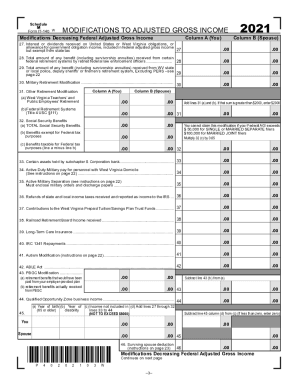
  2. Begin filling out Column A with your information for the year 2021. Enter relevant amounts for items such as interest or dividends received on state obligations and other modifications decreasing your federal adjusted gross income.
  3. Continue to Column B to list your spouse's corresponding amounts for the same modifications. Ensure accuracy to reflect both incomes clearly.
  4. Proceed through each line of the form, detailing any retirement modifications, social security benefits, or other income adjustments. Pay close attention to the instructions provided to avoid errors.
  5. Once all fields are completed, review your entries for accuracy. Ensure that total amounts on lines 47 and 48 match the required calculations.
  6. At the conclusion of your entries, options will be available to save your changes, download the completed form, print, or share it as needed. Choose the appropriate option based on your filing preference.

Complete your WV Schedule M IT-140 online today for accurate income reporting.

Get form

Experience a faster way to fill out and sign forms on the web. Access the most extensive library of templates available.

Related content

Individuals - WV State Tax Department

Booklet Personal Income Tax Forms and Instructions 2018. Prior year ... Schedule M (Form...

Learn more
West Virginia - Income Tax Forms - 2019 (for Tax...

Apr 15, 2019 - Income Tax Forms - 2019 (for Tax Year 2018): West Virginia ... IT-140...

Learn more
Questions & Answers

Get answers to your most pressing questions about US Legal Forms API.

Contact support

Who must file Schedule M 3 1065?

Any entity that files Form 1065 must file Schedule M-3 (Form 1065) if any of the following is true: The amount of total assets at the end of the tax year reported on Schedule L, line 14, column (d), is equal to $10 million or more.

Schedule M-1. When looking at the Schedule M-1, line items in the left hand column (lines 2-5) are adjustments added to book income. This results in an increase to taxable income. Line items in the right hand column (lines 7-8) are adjustments reducing book income. Lines 7-8 decrease taxable income.

Purpose of Schedule Schedule M-3, Parts II and III, reconcile financial statement net income (loss) for the U.S. corporation (or consolidated tax group, if applicable), as reported on Schedule M-3, Part I, line 11, to taxable income on Form 1120, page 1, line 28.

Schedule M (Form 990) is used by an organization that files Form 990 to report the types of noncash contributions received during the year by the organization and certain information regarding such contributions.

That credit is the Making Work Pay Credit, and claiming it means being familiar with Schedule M. Schedule M is a simple, one-page form appended to your Form 1040 (i.e., your tax return). ... Members of the military will need to know any non-taxable combat pay not included in their wages.

Retired Military Pay West Virginia State Tax Benefits: Effective January 1, 2018 West Virginia exempts all military pension income.

West Virginia has five tax rates 3%, 4%, 4.5%, 6% and 6.5%. Your tax rate and additional tax amount will depend on your filing status and taxable income.

You are considered a resident of West Virginia if you spend more than 30 days in West Virginia with the intent of West Virginia becoming your permanent residence, or if you are a domiciliary resident of Pennsylvania or Virginia and you maintain a physical presence in West Virginia for more than 183 days of the taxable ...

West Virginia State Income Tax Return forms for Tax Year 2018 (Jan. 1 - Dec. 31, 2018) can be e-Filed together with an IRS Income Tax Return until October 15, 2019. In January 2020, you can e-File Tax Year 2019.

All West Virginia residents who filed a federal return are required to file a resident tax return in West Virginia. If you did not file a federal return and your allowable deductions from personal exemptions do not exceed your adjusted gross income, you are required to file a West Virginia state income tax return.

Get This Form Now!

Use professional pre-built templates to fill in and sign documents online faster. Get access to thousands of forms.

If you believe that this page should be taken down, please follow our DMCA take down process here.

Get WV Schedule M IT-140