Loading
Get Irs 1095-a 2021-2026
This website is not affiliated with IRS
How it works
-

Open form follow the instructions
-

Easily sign the form with your finger
-

Send filled & signed form or save
How to fill out the IRS 1095-A online
Filling out the IRS 1095-A form is essential for individuals who received health insurance through the Marketplace. This guide provides clear and detailed instructions on how to fill out this important document online, ensuring you have all the necessary information at hand.
Follow the steps to fill out the IRS 1095-A effectively.
- Click ‘Get Form’ button to access the IRS 1095-A form and open it in the editor.
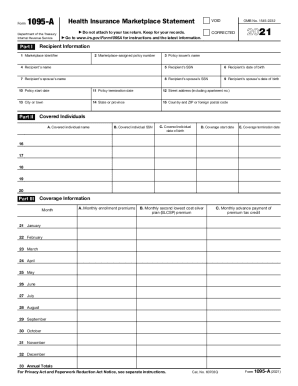
- Begin with Part I, which contains recipient information. Fill in the marketplace identifier, the assigned policy number, the name of the policy issuer, your name, social security number, and date of birth. Include information about your spouse if applicable, noting the dates for the policy's start and termination and your complete street address.
- Move to Part II to report covered individuals under your policy. Enter the names, social security numbers, and dates of birth for those covered by the health insurance, along with the start and end dates of their coverage.
- Next, complete Part III, which details coverage information. Fill in the monthly enrollment premiums, the second lowest cost silver plan premiums, and the monthly advance payments of the premium tax credit for each month of coverage.
- Make sure to review all information filled in the form for accuracy. Ensure that the totals for premiums and advance payments are correct.
- Once all fields are complete, save your changes, and download or print your completed form for your records. If needed, you may share the form as required.
Complete your IRS 1095-A form online today to ensure accurate filing of your tax return.