Loading
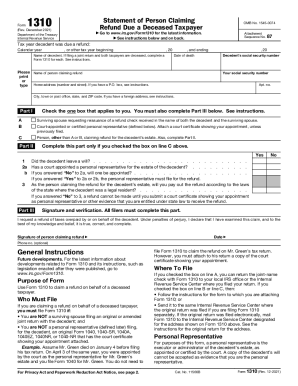
Get Irs 1310 2021
This website is not affiliated with IRS
How it works
-

Open form follow the instructions
-

Easily sign the form with your finger
-

Send filled & signed form or save
How to fill out the IRS 1310 online
Filling out the IRS Form 1310 is essential for individuals seeking to claim a refund on behalf of a deceased taxpayer. This guide provides a clear and structured approach to completing the form correctly and efficiently online.
Follow the steps to complete the IRS Form 1310 online.
- Click ‘Get Form’ button to access the IRS Form 1310 and open it in your editor.
- Begin by entering the tax year for which the decedent was owed a refund in the designated field.
- Input the name of the decedent and their social security number.
- Provide the date of death accurately to ensure proper processing.
- Complete the information for the person claiming the refund, including their name, address, and social security number.
- In Part I, check the appropriate box that applies to your situation: whether you are a surviving spouse or a representative claiming for the estate.
- If you checked option C in Part I, proceed to Part II and answer the questions regarding the decedent's will and personal representative status.
- In Part III, sign and date the form, affirming that you declare the information provided is true.
- After completing the form, review all entries for accuracy and completeness.
- Finally, save your changes, and depending on your preference, download, print, or share the completed form as needed.
Start claiming your documents online to ensure a smooth refund process.
Get form
Experience a faster way to fill out and sign forms on the web. Access the most extensive library of templates available.
Get This Form Now!
Use professional pre-built templates to fill in and sign documents online faster. Get access to thousands of forms.