Loading
Get Irs 1065 2021-2026
This website is not affiliated with IRS
How it works
-

Open form follow the instructions
-

Easily sign the form with your finger
-

Send filled & signed form or save
How to fill out the IRS 1065 online
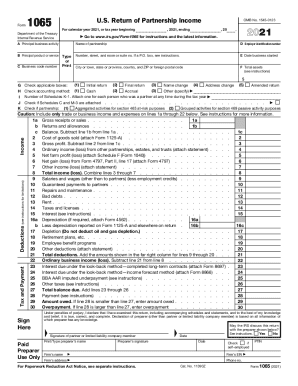
Filling out the IRS Form 1065 correctly is crucial for partnerships to report their income, deductions, gains, and losses for tax purposes. This guide provides a comprehensive walkthrough for users at all levels, highlighting important sections and offering step-by-step instructions for completing the form online.
Follow the steps to successfully complete the IRS 1065 form online.
- Use the ‘Get Form’ button to access the Form 1065 and open it in your preferred online document editor.
- Enter the name of the partnership in the designated field, along with the employer identification number (EIN) and the address information.
- Complete section A to F, including principal business activity, date the business started, total assets, and accounting method, ensuring accuracy in reporting.
- In the income section, accurately report gross receipts, returns and allowances, cost of goods sold, and other relevant income details.
- Detail all deductions incurred by the partnership, including salaries, guaranteed payments to partners, and various other business expenses.
- Complete the signature section with the appropriate partner or limited liability company member's signature, along with the preparer's details if applicable.
- Review the form for any missing information or errors before finalizing your submission.
- Once completed, save your changes, and choose to download, print, or share the completed document as needed.
Begin filling out the IRS 1065 online to ensure your partnership's income and deductions are accurately reported.
An LLC taxed as a partnership files an informational partnership tax return using tax Form 1065. However, if it did not receive any income during the year AND did not have any expenses that it will claim as deductions, then it is not required to file a return.