Loading
Get Irs 1099-r 2021-2026
This website is not affiliated with IRS
How it works
-

Open form follow the instructions
-

Easily sign the form with your finger
-

Send filled & signed form or save
How to fill out the IRS 1099-R online
Filling out the IRS 1099-R form online can be straightforward with the right guidance. This guide provides a step-by-step breakdown of each section and field to ensure you complete the form accurately and efficiently.
Follow the steps to fill out the IRS 1099-R form correctly.
- Click ‘Get Form’ button to obtain the form and open it in the editor.
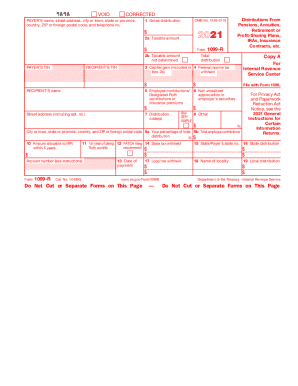
- Enter the payer’s name, street address, city or town, state or province, country, ZIP or foreign postal code, and telephone number in the appropriate fields.
- In box 1, input the total gross distribution amount you received during the tax year.
- Fill in box 2a with the taxable amount; if not determined, check box 2b.
- Complete box 3 if applicable, indicating any capital gains included in box 2a.
- Input the federal income tax withheld in box 4, if any.
- If relevant, fill in box 5 for any employee contributions or designated Roth contributions.
- For net unrealized appreciation, provide information in box 6 if applicable.
- Enter the distribution code(s) in box 7.
- Complete additional boxes as required, including state tax withheld in box 14 and local tax details if applicable.
- Review all the information for accuracy.
- Once finished, save your changes, then proceed to download, print, or share the completed form as needed.
Start filling out your IRS 1099-R form online to ensure timely and correct submissions.
You'll report amounts from Form 1099-R as income. This is because it's income in respect of a decedent. ... So, the income is taxable to the recipient in the year received. Regarding 1099-R distribution codes, retirement account distributions on Form 1099-R, Box 7, Code 4 are still taxable based on the amounts in Box 2a.