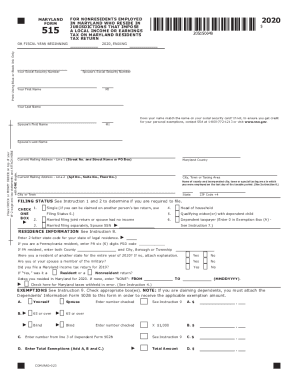
515OR FISCAL YEAR BEGINNINGPrint Using Blue or Black Ink Only2020FOR NONRESIDENTS EMPLOYED IN MARYLAND WHO RESIDE IN JURISDICTIONS THAT IMPOSE A LOCAL INCOME OR EARNINGS TAX ON MARYLAND RESIDENTS TAX.
Open form follow the instructions
Easily sign the form with your finger
Send filled & signed form or save
How to fill out the MD Comptroller 515 online
Filling out the MD Comptroller 515 form online can be straightforward when you follow clear instructions. This guide will help you navigate each section of the form to ensure accurate completion.
Follow the steps to complete the MD Comptroller 515 form online.
- Click ‘Get Form’ button to access the MD Comptroller 515 form and open it in the online editor.
- Enter your Social Security Number in the designated field. Ensure accuracy to prevent processing delays.
- Fill in your name, including your first name, middle initial, and last name, matching the name on your Social Security card.
- Provide your current mailing address, including street number and name, city, state, and ZIP code.
- Select your filing status by checking the appropriate box that matches your circumstances.
- Complete the residence information, entering the state code for your legal residence and other relevant details.
- Indicate your exemptions by checking the corresponding boxes and, if applicable, provide the required information about dependents using the Dependents' Information Form 502B.
- Input your income and adjustments in the relevant sections, ensuring to accurately report your federal income, Maryland wage income, and any non-Maryland income.
- Determine and enter any additions to or subtractions from your income, including military income or other applicable adjustments.
- Calculate your Maryland tax based on your taxable income. Use the tax tables or schedules as instructed.
- Final steps include reviewing all information for accuracy, saving changes, and utilizing options to download, print, or share your completed form.
Complete your MD Comptroller 515 form online today to stay on track with your tax responsibilities!
Experience a faster way to fill out and sign forms on the web. Access the most extensive library of templates available.
Related content
515, Maryland Tax Return - Nonresident Local Tax, Form and instructions for ... form for...
20, 06x, Institutional Support, President's office, The VPs, Comptroller, HR etc, Public...
... 513 Educational expenses 514 Employee business expenses 515 Casualty, ...... 881 873...
Get answers to your most pressing questions about US Legal Forms API.
Can you pay MD state taxes online?
Online Bill Pay is an easy, convenient and secure way to pay your Maryland tax liabilities online for free. This system may be used to make bill payments on business taxes using electronic funds withdrawal (direct debit) from a U.S. bank or financial institution. Foreign facilities will not be accepted.
Can you make tax payments online?
Official Payments - Pay 1040 & IRS Taxes Online - Federal Tax Payment Home. We provide technology systems that give you fast, easy and secure payment options for your taxes and bills, such as by internet, telephone and mobile app. ... Enjoy the convenience and flexibility of paying federal taxes by debit or credit card.
How do I pay my Maryland taxes with a credit card?
You can pay your Maryland tax with a credit card, using VISA, MasterCard, American Express or Discover. This service applies to taxes owed for the current year or any back year (if you have a bill). You can make your payment online or over the phone by calling 1-800-2PAYTAX (1-800-272-9829).
Can I pay my Maryland taxes online?
Online Bill Pay is an easy, convenient and secure way to pay your Maryland tax liabilities online for free. This system may be used to make bill payments on business taxes using electronic funds withdrawal (direct debit) from a U.S. bank or financial institution.
How do I pay Maryland taxes?
Payment Information. You can pay your Maryland taxes with a personal check, money order or credit card. You may also choose to pay by direct debit if you file electronically. If you file and pay electronically by April 15, you have until April 30 to make the electronic payment, using direct debit or a credit card.
How do I calculate estimated tax payments?
To calculate your estimated taxes, you will add up your total tax liability for the year including self-employment tax, income tax, and any other taxes and divide that number by four.
How do I pay quarterly taxes with 1099?
If you expect to owe more than $1,000 in tax on your self-employed income at the end of the year, The Internal Revenue Service requires you to make quarterly payments toward the debt. To estimate your quarterly tax payments, you must complete and file Form 1040-ES.
Do I have to make estimated tax payments for 2019?
If at least two-thirds of your gross income is from farming or fishing, you can make just one estimated tax payment for the 2019 tax year by January 15, 2020. If you file your 2019 tax return by March 2, 2020, and pay all the tax you owe at that time, you don't need to make any estimated tax payments.
Do I need to pay quarterly taxes?
The rule is that you must pay your taxes as you go. If at filing time, you have not paid enough income taxes through withholding or quarterly estimated payments, you may have to pay a penalty for underpayment. ... If so, then you're in the clear, and you don't need to make estimated tax payments.
How do you pay your taxes quarterly?
Sign up for the Electronic Federal Tax Payment System, or EFTPS. The system allows anyone to pay taxes they owe. ... Pay online via the IRS at www.irs.gov/payments. Pay using debit or credit card. Remit a check or money order using estimated tax payment voucher.
Use professional pre-built templates to fill in and sign documents online faster. Get access to thousands of forms.
If you believe that this page should be taken down, please follow our DMCA take down process here.
This form is available in several versions. Select the version you need from the drop-down list below.