Loading
Get Oh Dot D5 2021-2026
How it works
-

Open form follow the instructions
-

Easily sign the form with your finger
-

Send filled & signed form or save
How to fill out the OH DoT D5 online
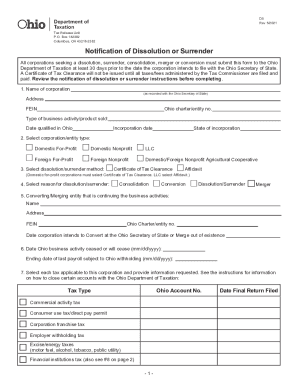
The OH DoT D5 form is essential for corporations seeking dissolution or surrender in Ohio. This comprehensive guide provides detailed, step-by-step instructions for successfully completing the form online, ensuring compliance with the Ohio Department of Taxation requirements.
Follow the steps to fill out the OH DoT D5 form online effectively.
- Press the ‘Get Form’ button to access the OH DoT D5 document and open it in your editor.
- In the first section, enter the name of your corporation as recorded with the Ohio Secretary of State, along with the corporation's address, Federal Employer Identification Number (FEIN), and Ohio charter/entity number. Specify the type of business activity or product sold, the date qualified in Ohio, and the incorporation date.
- Select the entity type from the available options: Domestic For-Profit, Domestic Nonprofit, LLC, Foreign For-Profit, Foreign Nonprofit, or Domestic/Foreign Nonprofit Agricultural Cooperative.
- Choose the method for dissolution or surrender. Domestic for-profit corporations must select 'Certificate of Tax Clearance,' while LLCs should select 'Affidavit.'
- Indicate the reason for dissolution or surrender by selecting one from the options: Consolidation, Conversion, Dissolution/Surrender, or Merger.
- Provide information about the entity continuing the business activities, including its name, address, FEIN, Ohio charter/entity number, and the intended date to convert or merge at the Ohio Secretary of State.
- Enter the date when Ohio business activity ceased or will cease, as well as the ending date of the last payroll subject to Ohio withholding.
- Choose all applicable tax types for your corporation, providing the relevant Ohio account numbers for each tax category listed: Commercial activity tax, Consumer use tax/direct pay permit, Corporation franchise tax, Employer withholding tax, Excise/energy taxes, Financial institutions tax, Sales tax/seller’s use tax, School district employer withholding tax, and Wireless 9-1-1 fee.
- If filing the financial institution tax as part of a group, provide the name and FIT account number of the reporting member.
- Identify the person’s details where the Certificate of Tax Clearance should be sent. If this individual is a representative, ensure that an Ohio TBOR 1 is attached.
- Provide details for any additional correspondence regarding tax matters, if different from step 10, and attach an Ohio TBOR 1 if necessary.
- List each officer’s and director’s name, title, address, and social security number. You may include an additional list if necessary.
- Read the declaration carefully and sign, affirming that the application has been reviewed and the statements are true to the best of your knowledge. Include your name, title, and date of signing.
- Once you have completed all sections, you can save your changes, download the form, print it, or share it as needed.
Complete your OH DoT D5 form online today to ensure a smooth dissolution process.
Call the IRS: 1-800-829-1040 hours 7 AM 7 PM local time Monday-Friday. Press 1 for English. ... Press 1 For questions about a form you have already submitted or Press 3 For all other questions about your tax history or Press 2 For all other questions about your tax history or payment