Loading
Get Irs 8752 2021
This website is not affiliated with IRS
How it works
-

Open form follow the instructions
-

Easily sign the form with your finger
-

Send filled & signed form or save
How to fill out the IRS 8752 online
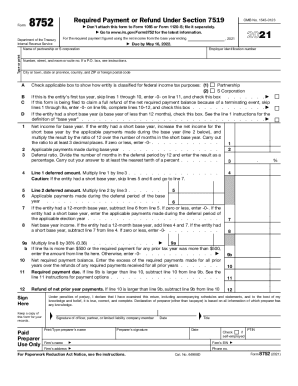
The IRS 8752 form is essential for partnerships and S corporations that have made a section 444 election to report the required payment or obtain a refund of net prior year payments. This guide aims to assist users in accurately completing the form online with clear, step-by-step instructions.
Follow the steps to complete your IRS 8752 form successfully.
- Click the ‘Get Form’ button to access the IRS 8752 form and open it in your editing platform.
- Enter the required information in the fields for the name of your partnership or S corporation. Make sure to type or print clearly.
- Fill in your employer identification number (EIN) accurately. This is essential for the IRS to identify your entity.
- Provide your entity's address, including street number, suite number (if applicable), city, state, and ZIP code.
- Mark the appropriate box to indicate the classification of your entity for federal income tax purposes (Partnership or S Corporation).
- If this is your entity's first tax year, check the box to indicate this and skip lines 1 through 10, entering ‘-0-’ on line 11.
- If you are filing to claim a full refund due to a terminating event, check the relevant box and skip to complete lines 10–12.
- For line 1, input the net income for the base year. If there are adjustments for a short base year, follow the calculation instructions given.
- On line 2, enter the applicable payments made during the base year, as defined in the instructions.
- For line 3, calculate and enter the deferral ratio as a percentage based on the deferral period.
- Multiply the results for line 1 and line 2 as necessary and fill out lines 4 to 12, following the prompts and instructions provided.
- Complete the signature section, ensuring the form is signed and dated by an authorized individual.
- After reviewing the form, you can save your changes, download, print, or share the completed IRS 8752 form as needed.
Begin filling out your IRS 8752 form online today to ensure you meet all necessary deadlines.
Get form
Experience a faster way to fill out and sign forms on the web. Access the most extensive library of templates available.
More In File An annual accounting period does not include a short tax year. The tax years you can use are: Calendar year - 12 consecutive months beginning January 1 and ending December 31. Fiscal year - 12 consecutive months ending on the last day of any month except December.
Get This Form Now!
Use professional pre-built templates to fill in and sign documents online faster. Get access to thousands of forms.