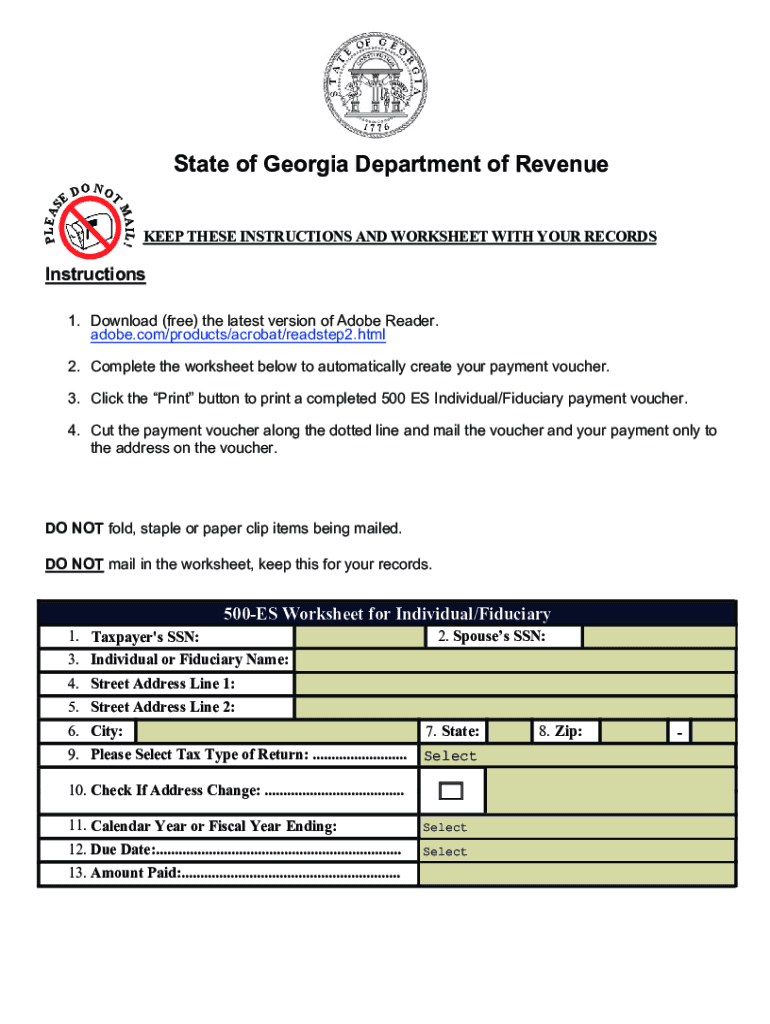
DO HOTMAIL!PLEASEState of Georgia Department of Revenue KEEP THESE INSTRUCTIONS AND WORKSHEET WITH YOUR RECORDSInstructions 1. Download (free) the latest version of Adobe Reader. adobe.com/products/acrobat/readstep2.html 2.
Loading

Open form follow the instructions

Easily sign the form with your finger

Send filled & signed form or save
How to fill out the GA DoR 500 ES online
Filing your estimated tax using the GA DoR 500 ES is an important process for individuals and fiduciaries subject to Georgia income tax. This guide will walk you through each section of the form to ensure you complete it accurately and efficiently.
Follow the steps to complete your GA DoR 500 ES form online.
- Click ‘Get Form’ button to access the GA DoR 500 ES form and open it in your preferred online editor.
- In the upper right corner, enter the name and address for the individual or fiduciary. Include 'Individual or Fiduciary Name' and both lines of the 'Street Address' field.
- Next, fill in the taxpayer's SSN and, if applicable, the spouse's SSN in the designated fields.
- Select the appropriate tax type by using the dropdown menu provided. Make sure to review your options carefully.
- Indicate if there is a change of address by checking the corresponding box and updating your address in the space provided.
- Choose the calendar year or fiscal year ending date using the available selection menu.
- Enter the due date, which relates to your estimated tax payment schedule, using the dropdown options.
- In the 'Amount Paid' field, input the amount you are submitting with this voucher, ensuring it is accurate.
- Once you have filled out all necessary fields, review your entries for completeness and accuracy.
- You can then save your changes, download, print the completed form, or share it as needed.
Complete your GA DoR 500 ES form online today to ensure timely filing.
Experience a faster way to fill out and sign forms on the web. Access the most extensive library of templates available.
Related content
The Georgia Tax Center will be down for scheduled maintenance on Sunday, December ... 2019...
Nov 19, 2019 - GA Dept of Revenue website has Form IT-511 booklets, Form 500 ... For other...
Like the F-15C, it also carries an internally mounted General Electric M61A1 20 mm cannon...
Get answers to your most pressing questions about US Legal Forms API.
How much do I have to make to file taxes in Georgia?
How much do you have to make to file taxes, i.e., what is the minimum income to file taxes, the answer depends on your gross income for the particular year in which you are filing. For 2017, if your gross income was at least: Single filing status: $10,400 if under age 65.
Do I need to file a GA tax return?
If you are a legal resident of Georgia for only a portion of the tax year and are required to file a federal income tax return, you are required to file a Georgia Form 500 Individual Income Tax Return. You must complete Page 6, Schedule 3 to determine your Georgia Taxable income.
Who Must File Ga tax return?
Residents. If you are a resident of Georgia and filed a federal tax return, you need to file a state tax return. If you are single and the head of household, you need to file a return if your gross income is greater than $9,750.
Who has to file a GA tax return?
Residents. If you are a resident of Georgia and filed a federal tax return, you need to file a state tax return. If you are single and the head of household, you need to file a return if your gross income is greater than $9,750.
How does the standard deduction work?
What Is a Standard Deduction? The Internal Revenue Service (IRS) standard deduction is the portion of income that is not subject to tax that can be used to reduce your tax bill. You can take the standard deduction only if you do not itemize your deductions using Schedule A of Form 1040 to calculate taxable income.
What is Georgia's state income tax?
Georgia Income Tax. Georgia utilizes a relatively simple progressive income tax system, with rates ranging from 1% to 6%. Higher earners pay higher rates, although Georgia's brackets top out at $7,000 for single filers, which means the majority of full-time workers will pay the top rate.
What is the Georgia income tax rate for 2019?
Applicable to tax years beginning on or after January 1, 2019, the corporate income tax rate and the highest individual income tax rate, both currently 6%, decrease to 5.75%.
What is the Georgia standard deduction for 2018?
As for the state standard deduction, this amount has doubled and will go into effect retroactively for tax year 2018. So, for individuals, the new deduction amount is $4,600, and for married couples filing jointly the deduction is $6,000. Many companies doing business in Georgia scored a win, too.
What is Georgia's standard deduction?
Updates Georgia's state tax code to include many of the federal changes to personal income tax deductions. Adopted alone, these changes would have generated up to $1.1 billion in new revenue in 2020. Doubles standard deduction to $4,600 for individuals or $6,000 for married couples through 2025 ($515 million in FY 2020 ...
Do I need to file 1099 Misc Georgia?
Does Georgia require state 1099 tax filing? Yes, Georgia requires you to file 1099s to the Georgia State Revenue Commissioner.
Use professional pre-built templates to fill in and sign documents online faster. Get access to thousands of forms.
If you believe that this page should be taken down, please follow our DMCA take down process here.