Loading
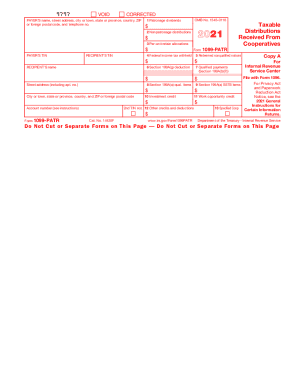
Get Irs 1099-patr 2021
This website is not affiliated with IRS
How it works
-

Open form follow the instructions
-

Easily sign the form with your finger
-

Send filled & signed form or save
How to fill out the IRS 1099-PATR online
Filing your IRS 1099-PATR form online can streamline the process of reporting your taxable distributions received from cooperatives. This guide provides a step-by-step approach to help you accurately complete this form and ensure that your information is correctly reported.
Follow the steps to successfully complete your IRS 1099-PATR online.
- Click ‘Get Form’ button to acquire the IRS 1099-PATR form and open it in your editor.
- In the payer’s section, enter the name, street address, city or town, state or province, country, zip or foreign postal code, and telephone number accurately.
- Input the payer’s taxpayer identification number (TIN) in the designated field.
- In the recipient’s section, enter the recipient’s name and address, ensuring to include the street address and city or town along with the state or province, country, and zip or foreign postal code.
- Fill in the recipient’s taxpayer identification number (TIN) in the appropriate box.
- Enter amounts in the relevant boxes based on the specifics of distributions received: box 1 for patronage dividends, box 2 for nonpatronage distributions, box 3 for per-unit retain allocations, and box 5 for redeemed nonqualified notices.
- If applicable, include any federal income tax withheld in box 4.
- Complete boxes 6 to 12 for section 199A deductions and any associated credits, ensuring you follow the guidelines for each specific box.
- Review all provided information for accuracy and completeness.
- Once all fields are filled correctly, save your changes, and choose to download, print, or share the form as needed.
Take the next step and complete your IRS 1099-PATR form online today.
Get form
Experience a faster way to fill out and sign forms on the web. Access the most extensive library of templates available.
The 1099-PATR income should be shown as Other Income reported on Form 1040, Schedule 1, Part I, Line 8. You should report it as 1099-PATR profits from your co-op and list the co-op's Tax Payer Identification Number (TIN).
Get This Form Now!
Use professional pre-built templates to fill in and sign documents online faster. Get access to thousands of forms.