Loading
Get De 5402 2005
How it works
-

Open form follow the instructions
-

Easily sign the form with your finger
-

Send filled & signed form or save
How to fill out the DE 5402 online
Filling out the DE 5402, Realty Transfer Tax Return and Affidavit of Gain and Value, can be a straightforward process if you understand each component. This guide offers detailed, step-by-step instructions tailored to assist users with varying levels of experience in completing this form online.
Follow the steps to successfully complete the DE 5402 online.
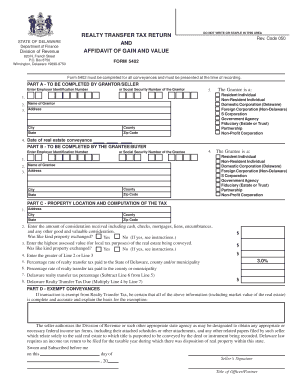
- Click ‘Get Form’ button to obtain the form and access it in the designated editor.
- In Part A, enter the Employer Identification Number or Social Security Number of the Grantor. This information is essential for identification purposes.
- Provide the name of the Grantor in the specified field. Ensure that it accurately reflects the individual or entity involved in the transaction.
- Fill in the address details of the Grantor, including city, county, state, and zip code. This information is necessary for correspondence.
- Check the box indicating whether the Grantor is a Resident Individual, Non-Resident Individual, Corporation, Government Agency, or other applicable category.
- Enter the date of the real estate conveyance, ensuring it matches the transaction timeline.
- Move to Part B and enter the Employer Identification Number or Social Security Number for the Grantee, similarly to the Grantor's details.
- Input the name of the Grantee in accordance with their legal designation.
- Complete the Grantee's address with accurate city, county, state, and zip code information for successful communication.
- Indicate whether the Grantee is a Resident Individual, Non-Resident Individual, Corporation, Government Agency, or other relevant classification.
- Proceed to Part C, providing the address of the property being conveyed.
- Indicate the amount of consideration received during the transaction, including all forms of consideration such as cash and mortgages.
- Enter the highest assessed value of the real estate as determined for local tax purposes.
- Calculate the greater amount between Line 2 and Line 3 and input it in the designated field.
- Fill in the applicable percentage rates for the realty transfer tax paid to the state and any local municipalities.
- Finally, calculate the Delaware Realty Transfer Tax due by multiplying the amount from Line 4 by the tax percentage from Line 7.
- For Part D, if applicable, explain any exemptions from the Realty Transfer Tax and ensure the document is properly notarized and signed before submission.
- Once all information is accurately entered, users can save changes, download, print, or share the completed form as necessary.
Complete your DE 5402 online today to ensure your real estate transactions are handled efficiently.
Get form
Experience a faster way to fill out and sign forms on the web. Access the most extensive library of templates available.
Related links form
Get This Form Now!
Use professional pre-built templates to fill in and sign documents online faster. Get access to thousands of forms.