Loading
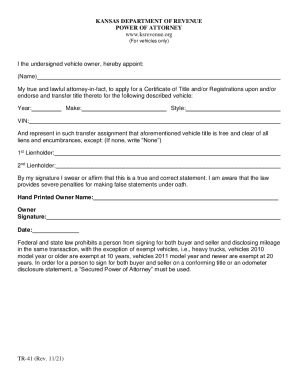
Get Ks Tr-41 2021-2026
How it works
-

Open form follow the instructions
-

Easily sign the form with your finger
-

Send filled & signed form or save
How to fill out the KS TR-41 online
The KS TR-41 form is essential for vehicle owners in Kansas who wish to appoint an attorney-in-fact to facilitate the application for a Certificate of Title and/or Registration. This guide provides clear, step-by-step instructions on how to complete the form effectively online.
Follow the steps to complete the KS TR-41 easily.
- Click the ‘Get Form’ button to access the KS TR-41 form online.
- In the first section, fill in the name of the person you are appointing as your attorney-in-fact. Ensure you include their full legal name.
- Next, you will need to complete the vehicle details. Provide the year, make, style, and VIN (Vehicle Identification Number) of the vehicle in the designated fields.
- Indicate if there are any encumbrances on the vehicle's title by listing the names of any lienholders. If there are no liens, write 'None' in the specified space.
- Sign your name in the designated signature field to affirm that the information provided is true and correct. This signature is your personal assurance of the accuracy of the document.
- Finally, enter the date of signing in the provided area. Review all the information for accuracy before proceeding.
- Once you have completed and reviewed the document, you can save changes, download, print, or share the KS TR-41 form as needed.
Complete your KS TR-41 document online today for efficient vehicle title processing.