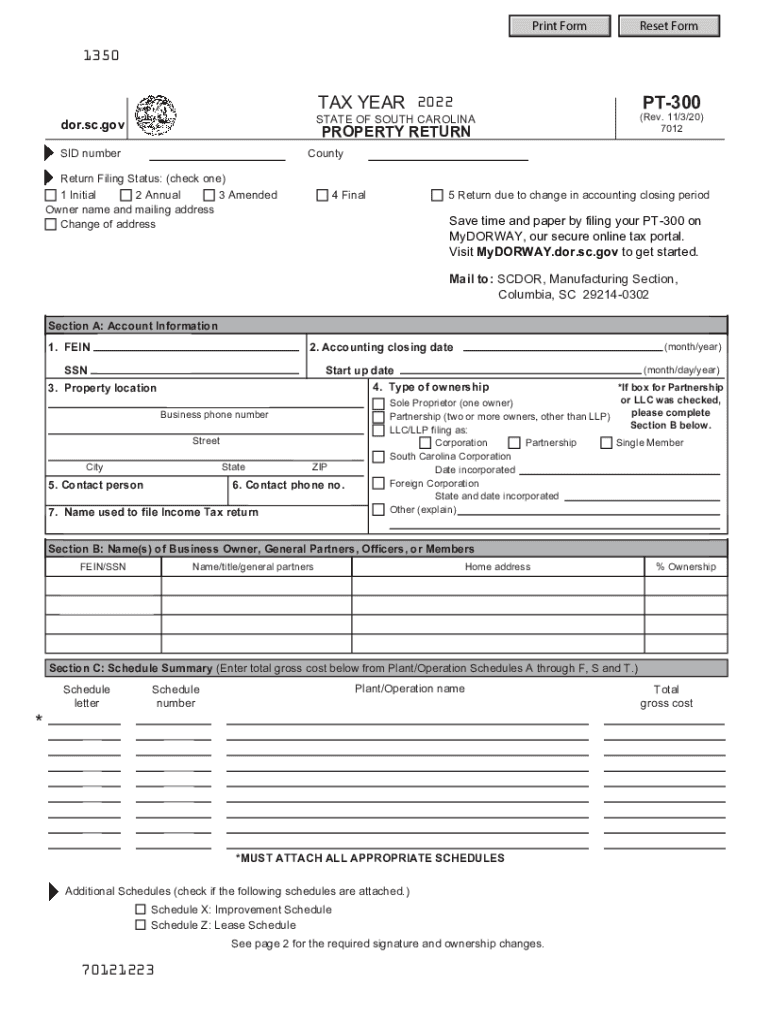
Print FormReset Form1350PT300TAX YEAR 2022(Rev. 11/3/20) 7012STATE OF SOUTH CAROLINAdor.sc.govPROPERTY RETURNSID numberCountyReturn Filing Status: (check one) 1 Initial 2 Annual 3 Amended Owner name.
Loading

Open form follow the instructions

Easily sign the form with your finger

Send filled & signed form or save
How to fill out the SC DoR PT-300 online
The SC DoR PT-300 is an important property return form for individuals and businesses in South Carolina. This guide provides a clear and supportive approach to help you complete the form accurately and effectively online.
Follow the steps to complete the SC DoR PT-300 online
- Press the ‘Get Form’ button to access the PT-300 form and open it in your preferred editor.
- Indicate the type of ownership by selecting the appropriate option. If you select 'Partnership' or 'LLC,' be sure to complete Section B with the details of all business owners or general partners.
- In Section C: Schedule Summary, enter the total gross cost from the required schedules you must attach. Make sure all relevant schedules are completed and attached.
- If applicable, complete Section D: Associated Leases by filling in details about any leases associated with the property.
- Next, if there have been any changes to your account information, report these in Section E: Account Information Changes.
- In Section F: Ownership Changes, provide information about any changes in ownership, including the names of parties involved and the date of sale if applicable.
- Before submitting, review the entire form for accuracy. Ensure that you sign and date the form both as the taxpayer and the preparer where required.
- Once the form is complete, you can save your changes, download it, print it, or share it as needed.
Complete your SC DoR PT-300 online today for a smooth and efficient filing experience.
Experience a faster way to fill out and sign forms on the web. Access the most extensive library of templates available.
Related content
Need forms assistance? SCDOR news SCDOR twitter SCDOR facebook. Copyright © 2019 South...
... Statutes for Present Use Applications · Application for Present Use Program ·...
PT.)both in compilation and execution. A users manual does exist. ..... _____~ 6 ('L-r~...
Get answers to your most pressing questions about US Legal Forms API.
Is property tax based on home value?
Property taxes are calculated by taking the mill levy and multiplying it by the assessed value of your property. The assessed value estimates the reasonable market value for your home. It is based upon prevailing local real estate market conditions.
How much is vehicle property tax in SC?
SC Vehicle Property Tax This fee is 5% of the price up to a maximum of $500 effective July 1, 2017. The IMF is in addition to applicable title and registration fees and annual personal property taxes. Additionally, if relocating to SC, residents are required to register vehicles within 45 days.
How is property tax calculated?
Find the assessed value of the property being taxed. ... Add the value of the land and improvements to get the total value. ... Find the current local government's tax rate. ... Find the property tax rates for other local agencies. ... Add your tax rates up. ... Multiply by your property value.
How is property tax calculated in South Carolina?
Homeowners in South Carolina pay annual property taxes based on the assessed value of their property and on their local tax rate. Assessed value is equal to a percentage of market value. ... For owner-occupied, primary residences the assessment ratio is 4%. For non-primary residences, the rate is 6%.
How is personal property tax calculated in South Carolina?
Homeowners in South Carolina pay annual property taxes based on the assessed value of their property and on their local tax rate. Assessed value is equal to a percentage of market value. ... For owner-occupied, primary residences the assessment ratio is 4%. For non-primary residences, the rate is 6%.
Can I download my tax return online?
You can request copies of your IRS tax returns from the most recent seven tax years. ... If you filed your taxes with a TurboTax CD/download product, your tax return is stored on your computer, so you can print a copy at any time. If you used TurboTax Online, you can log in and print copies of your tax return for free.
How can I get a copy of previous years w2?
Requesting a Duplicate W-2 from a Previous Tax Year. Use Form 4506 to order a copy of a previous year's tax return from the IRS. The IRS keeps copies of W-2 forms from your previous tax years. To get a copy from the IRS you must order a copy of your entire tax return by using Form 4506.
How do I get a copy of my 2016 state tax return?
Order Online. The fastest way to get a Tax Return or Account transcript is through the 'Get Transcript' tool available on IRS.gov. ... Order by phone. You can also order by phone at 800-908-9946 and follow the prompts. Order by mail.
Can you view your old tax returns online?
You can request an IRS transcript of your tax return from the IRS website. A transcript includes items from your tax return as it was originally filed and will meet lending or immigration requirements. There are three ways to request a transcript: Visit the IRS website for instant online access to your transcript.
How can I get a copy of my 2017 state tax return?
Order online. Use the 'Get Transcript ' tool available on IRS.gov. There is a link to it under the red TOOLS bar on the front page. ... Order by phone. The number to call is 800-908-9946. Order by mail. Complete and send either Form 4506-T or Form 4506T-EZ to the IRS to get one by mail.
Use professional pre-built templates to fill in and sign documents online faster. Get access to thousands of forms.
If you believe that this page should be taken down, please follow our DMCA take down process here.