Loading
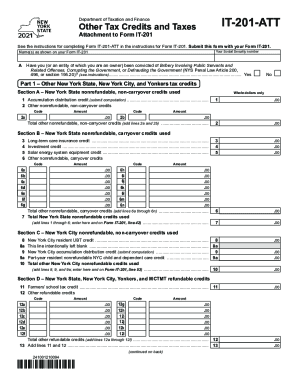
Get Ny Dtf It-201-att 2021-2026
How it works
-

Open form follow the instructions
-

Easily sign the form with your finger
-

Send filled & signed form or save
How to fill out the NY DTF IT-201-ATT online
Filling out the NY DTF IT-201-ATT form online is essential for claiming various tax credits in New York. This guide will provide you with clear, step-by-step instructions to navigate the form effectively.
Follow the steps to complete your NY DTF IT-201-ATT form online successfully.
- Use the 'Get Form' button to access the form and open it in an online editor.
- Enter the name(s) as displayed on your Form IT-201 in the designated field.
- Provide your Social Security number in the appropriate space.
- Indicate whether you or an entity you own have been convicted of any disqualifying offenses by selecting 'Yes' or 'No'.
- In Part 1, Section A, list your New York State nonrefundable, non-carryover credits. Fill in any applicable amounts and codes as necessary.
- Continue to Section B: report New York State nonrefundable, carryover credits, ensuring you provide accurate codes and amounts.
- In Section D, document any refundable credits, adding totals as indicated.
- Complete Part 2 if applicable, detailing any other New York State taxes owed.
- In Part 3, address any New York City taxes, following similar procedures for documenting amounts.
- Review all entries for accuracy and completeness before proceeding to the final step.
- Once satisfied, save your changes, and download or print the completed form for submission with your Form IT-201.
Complete your NY DTF IT-201-ATT form online today to ensure timely tax credit claims.
Vote to incorporate. ... Appoint an incorporator and create the initial board of directors. ... Obtain a registered agent. ... Check the availability of your nonprofit's name. ... Download the certificate of incorporation template from the New York Department of State website. ... Complete the certificate of incorporation form.