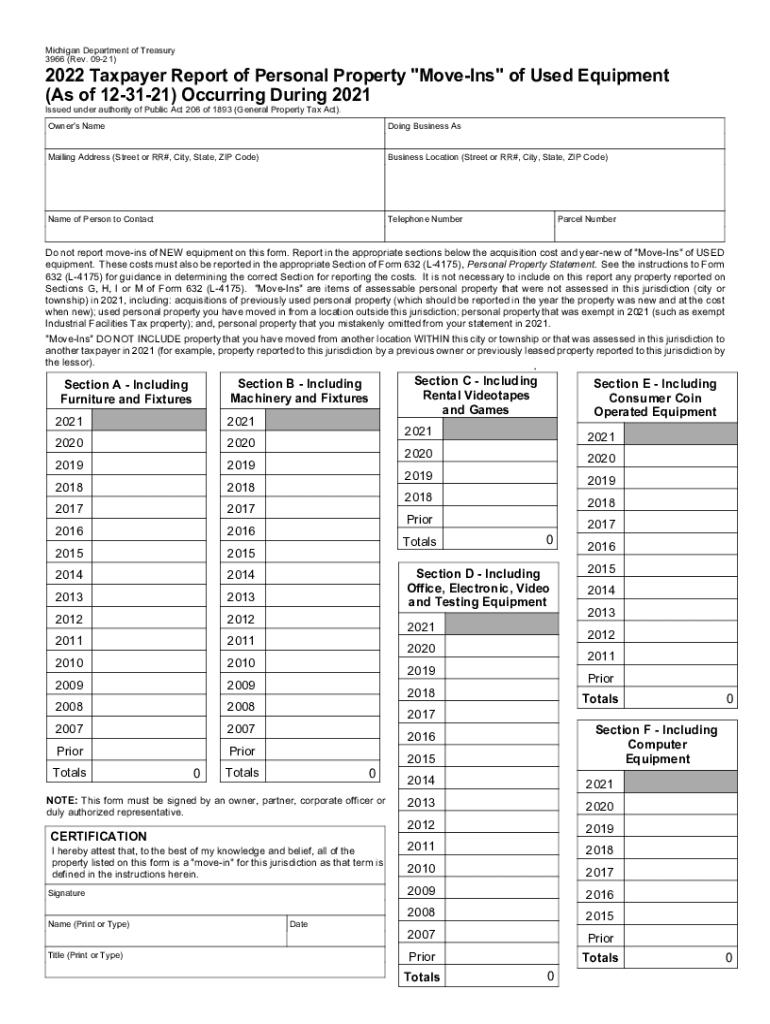
Reset Form Michigan Department of Treasury 3966 (Rev. 0921)2022 Taxpayer Report of Personal Property "MoveIns " of Used Equipment (As of 123121) Occurring During 2021 Issued under authority.

Open form follow the instructions

Easily sign the form with your finger

Send filled & signed form or save
How to fill out the MI 3966 online
The MI 3966 form is essential for reporting personal property move-ins of used equipment for tax purposes. This guide will walk you through each section of the form, ensuring you accurately complete it online.
Follow the steps to fill out the MI 3966 online efficiently.
- Click ‘Get Form’ button to obtain the form and open it for editing.
- Enter your owner's name in the respective field. Ensure this matches the legal name associated with the property.
- Input your 'Doing Business As' name, if applicable, to provide clarity on the business operation.
- Fill in the mailing address completely, including street or RR#, city, state, and ZIP code, to ensure accurate correspondence.
- Provide the business location using the same format as the mailing address. This is where the personal property is stored or used.
- Indicate the name and contact information of a person to reach regarding this form; this provides a point of contact for inquiries.
- Enter the telephone number for the contact person. Ensure it is accurate, as it may be used for follow-up questions.
- Input the parcel number associated with the property. This number identifies the specific piece of real estate concerning tax assessments.
- Complete the appropriate sections for reporting used equipment move-ins. Be mindful of the distinction that new equipment should not be included.
- Provide acquisition costs and the year-new for the used equipment in the designated sections. Review the related guidance for Form 632 if necessary.
- In the certification area, sign your name, and print your title to validate the form. Ensure this is signed by an authorized person, such as an owner or corporate officer.
- Finally, save your changes, download a copy for your records, and print or share the form as needed.
Complete your MI 3966 online today to ensure compliance and keep your records up to date.
Experience a faster way to fill out and sign forms on the web. Access the most extensive library of templates available.
Related content
H.R.3966 - Raise Wages, Cut Carbon Act of 2019116th Congress ... Latest Action: House...
+ springLang.Ge_Next + «, October 2019, + springLang.Ge_Prev + ». Su, Mo, Tu, We, Th...
The!reported!margin!of!error!is!plus!or!minus!2.2%.!YouGov!also!supplied! ..... 273 26...
Use professional pre-built templates to fill in and sign documents online faster. Get access to thousands of forms.
If you believe that this page should be taken down, please follow our DMCA take down process here.
This form is available in several versions. Select the version you need from the drop-down list below.