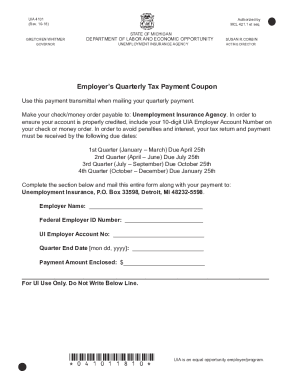
UIA 4101 (Rev. 1018)Reset FormGRETCHEN WHITMER GOVERNORSTATE OF MICHIGANDEPARTMENT OF LABOR AND ECONOMIC OPPORTUNITY UNEMPLOYMENT INSURANCE AGENCYAuthorized by MCL 421.1 et seq. SUSAN R.CORBINACTING.
Open form follow the instructions
Easily sign the form with your finger
Send filled & signed form or save
How to fill out the MI UIA 4101 online
The MI UIA 4101 is a crucial form used by employers in Michigan to submit their quarterly tax payment for unemployment insurance. This guide will provide clear, step-by-step instructions to help users complete the form accurately and effectively online.
Follow the steps to complete the MI UIA 4101 form online.
- Click ‘Get Form’ button to obtain the form and open it in the editor.
- Enter the employer’s name into the designated field. Ensure the name is accurate to avoid any potential issues with processing your payment.
- Provide the Federal Employer ID Number in the specified section. This number is essential for the identification of your business.
- Fill in your UI Employer Account Number. This 10-digit number helps to ensure your payment is credited to the correct account.
- Enter the Quarter End Date in the format [month day, year]. This date indicates the end of the reporting period for which you are making a payment.
- Specify the Payment Amount Enclosed in the appropriate field. Ensure that this amount reflects the total payment you are submitting.
- Once all required fields are completed, review the form for accuracy. Make any necessary corrections before proceeding.
- After final review, you can save changes, download the form, print it, or share it as needed to complete your submission.
Complete your MI UIA 4101 form online today to ensure timely processing of your unemployment insurance payment.
Experience a faster way to fill out and sign forms on the web. Access the most extensive library of templates available.
Related content
Unemployment Insurance - Forms. ... UIA 4101 - Employer's Quarterly Tax Payment Coupon PDF...
131) - Image 5. Resource type: Text; Publication: The Michigan Daily, 1972-03-24 ... g uia...
WORTMAN DATE MI',CRO VAX ASSY ~6FE:B8~ DATE SHEET I OF 4 , TOP DOC. ...... X DAL ~JS - - I...
Get answers to your most pressing questions about US Legal Forms API.
How do I find my employer identification number on my paystub?
The EIN is a nine-digit number in the format 12-3456789. For security reasons, your employer is not legally required to list its EIN on pay stubs, but it is common practice and the most convenient place to look. Call your employer's human resources department and ask for its EIN.
What is an employer EAN number?
A state Employer Identification Number (EIN) or Employer Account Number (EAN) is a number assigned by a state government to an employer to track one of the following: Payroll tax liabilities and remittances. Unemployment insurance liability.
How do you find your employers Ean?
As you complete your forms, find your employer's state unemployment tax number. Generally, states keep it simple by using the IRS-issued Employer Identification Number. Locate your W-2 form for your most recent employer.
How do I print quarterly wage reports in QuickBooks?
Choose Employees in the section Payroll Center. Click the File Forms tab. Click on View/Print forms & W-2s. Enter Payroll PIN then Click OK. Click Filed Forms from the upper-left corner of the Payroll Tax Center window. Select the forms you want to view or print.
What is wage report?
Wage report is a quarterly report by a subject employer record the wages of each individual worker in employment during the quarter.
What is a de9c report?
Form DE9C is the quarterly wage and withholding report for California employers. The form is used to report wage and payroll tax withholding information for California employers. In a way, it is the California equivalent of the Form 941 except the detailed withholding for each employee is reported.
What is a quarterly wage detail report?
The Quarterly Wage and Tax Report document is used by employers to report wage and payroll tax withholding information each quarter. ... When setting up new insurance, this document is used to account for every employee currently employed by the company and to confirm enrollment eligibility.
How do I apply for Michigan Works?
What you'll need to apply. Social security number. ... Apply online. File anytime at home, the library or on one of our computers in a service center. ... Apply by phone. Register by calling 866-500-0017 during business hours. Apply in-person. Visit the UIA office in-person anytime Monday-Friday from 8am-4pm: ... Register for work.
Can I register for Michigan Works online?
To meet the registration requirement, you must create an account and profile on Pure Michigan Talent Connect. You can create your profile online at www.mitalent.org. Employers can also use Pure Michigan Talent Connect in their search for workers.
What is a MiWAM account?
The Michigan Web Account Manager (MiWAM) is the UI's system for managing your own UI account online. MiWAM makes doing business with the UI simpler, faster and more efficient. With MiWAM you can: Check your claim balance and benefit payment history. ... Choose or change your payment method (debit card or direct deposit)
Use professional pre-built templates to fill in and sign documents online faster. Get access to thousands of forms.
If you believe that this page should be taken down, please follow our DMCA take down process here.