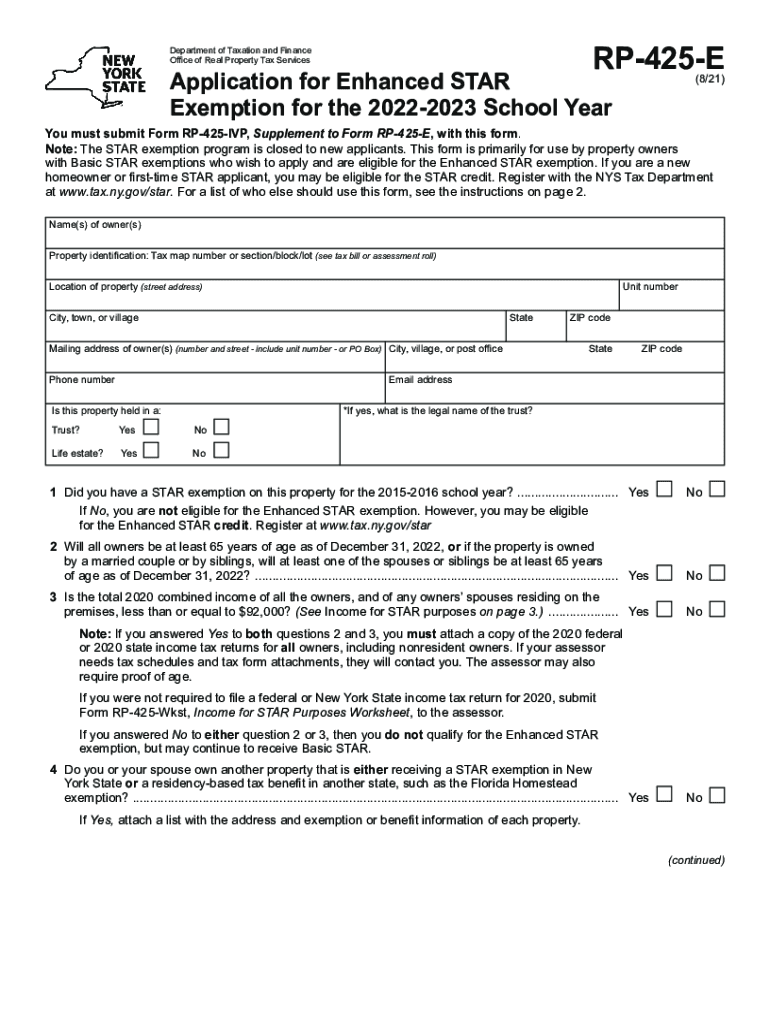
RP425EDepartment of Taxation and Finance Office of Real Property Tax ServicesApplication for Enhanced STAR Exemption for the 20222023 School Year(8/21)You must submit Form RP425IVP, Supplement to.
Loading

Open form follow the instructions

Easily sign the form with your finger

Send filled & signed form or save
How to fill out the NY RP-425-E online
This guide provides a comprehensive overview of how to complete the NY RP-425-E form online for the Enhanced STAR exemption. Follow these steps to ensure that you fill out the form accurately and completely, maximizing your benefits.
Follow the steps to successfully complete the NY RP-425-E form online.
- Press the ‘Get Form’ button to obtain the NY RP-425-E form and open it in your preferred online editor.
- Enter the names of all property owners in the designated field. Make sure to provide accurate and complete information as it appears on your legal documents.
- Fill in the property identification details, including the tax map number or section/block/lot, which can be found on your tax bill or assessment roll.
- Provide the location details of your property, including the street address, unit number (if applicable), city, town, village, state, and ZIP code.
- Input the mailing address for the owners. If differing from the property location, ensure to include any unit number or specify a PO Box if applicable.
- Enter the phone number and email address of the owner(s) for communication purposes.
- Indicate whether the property is held in a trust or a life estate by selecting 'Yes' or 'No.' If 'Yes', provide the legal name of the trust.
- Answer the questions regarding prior STAR exemptions, age qualifications, and income limits as indicated. Attach necessary tax documents if prerequisites are met.
- Complete the Certification section by reading the cautions thoroughly, then sign and date the form. Ensure all resident owners provide their signatures.
- Finally, submit the completed form along with Form RP-425-IVP and any required proof of income to your local assessor before the applicable deadline. Save your changes, download a copy for your records, or share the form if required.
Complete your NY RP-425-E form online today and secure your Enhanced STAR exemption benefits!
Experience a faster way to fill out and sign forms on the web. Access the most extensive library of templates available.
Related content
Aug 27, 2019 - Do not file any exemption applications with the NYS Department of Taxation...
The State University of New York at Fredonia .... 95, August 2018, 132-133. .... Barneva...
English is a West Germanic language that was first spoken in early medieval England and...
Get answers to your most pressing questions about US Legal Forms API.
How do I file a grievance in Nassau County?
Submitting an online application is the easiest and fastest way. Click Here to Apply for Nassau Tax Grievance. Click this link if you prefer to print out the application in PDF form and fax it to 631-782-3174. Or you can call us at 516-342-4849.
How do I apply for a STAR exemption in Nassau County?
To apply to STAR, a new applicant must: Use Form RP-425, Application for School Tax Relief (STAR) Exemption, available on the Tax Department's website at tax.ny.gov or contact the Nassau County Assessor's Office at (516) 571-1500. File the application with the Nassau County Assessor's Office.
How do I apply for a star in Nassau County?
To apply to STAR, a new applicant must: Use Form RP-425, Application for School Tax Relief (STAR) Exemption, available on the Tax Department's website at tax.ny.gov or contact the Nassau County Assessor's Office at (516) 571-1500. File the application with the Nassau County Assessor's Office.
How does the star tax credit work?
The property tax relief credit directly reduces your property tax burden if you are a qualifying homeowner. If you're eligible for the credit, we'll automatically send you a check. ... receive either the Basic or Enhanced STAR exemption or credit, have an income of $275,000 or less, and.
What is enhanced star?
Enhanced STAR provides an increased benefit for the primary residences of senior citizens (age 65 and older) with qualifying incomes ($86,000 or less). The Enhanced STAR benefit is based on the first $65,500 of the full assessed value of the home.
How does Enhanced STAR work?
What is Enhanced STAR? Enhanced STAR provides an increased benefit for the primary residences of senior citizens (age 65 and older) with qualifying incomes ($86,000 or less). The Enhanced STAR benefit is based on the first $65,500 of the full assessed value of the home.
What is the income limit for enhanced star in NY?
Basic STAR is for homeowners' primary residence if their household income is less than $500,000. The average tax break is about $790 a year, while the average Enhanced STAR was about $1,400 for eligible seniors. Enhanced STAR is for homeowners age 65 and older with incomes of $86,300 or less.
How much is NYS Enhanced STAR exemption?
Important information for STAR exemption recipients If you currently receive the Basic STAR exemption and your income is between $250,000 and $500,000, the program is changing for you.
What is the tax exemption for senior citizen?
NEW DELHI: Senior citizens with a taxable income of up to Rs 5 lakh can now submit in banks and post offices Form 15H to claim exemption from TDS on interest income on deposits, according to a CBDT notification.
What is a senior STAR exemption?
What is the Senior Citizens' Exemption? The Senior Citizens' Exemption is a benefit program that reduces your property taxes by 50%. If you're 65 or older and earn $29,000 or less, you may be eligible.
Use professional pre-built templates to fill in and sign documents online faster. Get access to thousands of forms.
If you believe that this page should be taken down, please follow our DMCA take down process here.
This form is available in several versions. Select the version you need from the drop-down list below.