Loading
Get Ct Drs Ct-1120 2020
How it works
-

Open form follow the instructions
-

Easily sign the form with your finger
-

Send filled & signed form or save
How to fill out the CT DRS CT-1120 online
Filling out the CT DRS CT-1120 form is an essential step for corporations operating within Connecticut to report their business income and taxes. This guide provides clear, step-by-step instructions to help users complete the form online efficiently and accurately.
Follow the steps to complete the CT DRS CT-1120 online
- Click the ‘Get Form’ button to access the CT DRS CT-1120 and open it in your document editor.
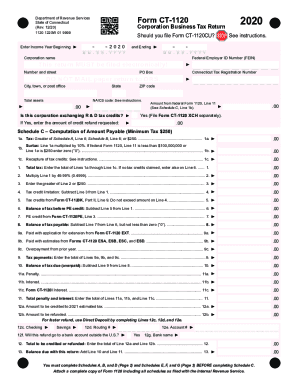
- Begin by entering the 'Income Year Beginning' and 'Ending' dates in the specified fields.
- Fill in the corporation name and the Federal Employer Identification Number (FEIN). Make sure to verify the accuracy of this information.
- Provide your Connecticut Tax Registration Number and enter your corporation's address, including city, state, and ZIP code.
- Indicate if your corporation is exchanging R & D tax credits by selecting 'Yes' or 'No', and if 'Yes', state the amount of credit refund requested.
- Calculate 'Total assets' and enter the amount accurately.
- On Schedule C, determine the tax amount based on the instructions and fill in the corresponding lines for your computed amount.
- Continue to complete Schedules A, B, and D on Page 2. Follow the guidelines provided to calculate your tax accurately.
- Once all sections are filled, review each entry for accuracy and completeness to avoid any errors.
- Finalize the process by saving your completed form. You can download, print, or share the form as needed.
Complete your CT DRS CT-1120 form online today to ensure timely filing.
Get form
Experience a faster way to fill out and sign forms on the web. Access the most extensive library of templates available.
Get This Form Now!
Use professional pre-built templates to fill in and sign documents online faster. Get access to thousands of forms.