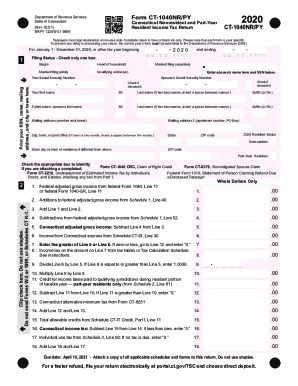
2020Form CT1040NR/PYDepartment of Revenue Services State of Connecticut (Rev. 02/21) NRPY 1220W 01 9999Connecticut Nonresident and PartYear Resident Income Tax ReturnCT1040NR/PYTaxpayers must sign.
Open form follow the instructions
Easily sign the form with your finger
Send filled & signed form or save
How to fill out the CT DRS CT-1040NR/PY online
Filing your Connecticut Nonresident and Part-Year Resident Income Tax Return, known as the CT-1040NR/PY, can be straightforward when you understand the process. This guide provides clear, step-by-step instructions to help you complete the form accurately and efficiently online.
Follow the steps to complete the CT DRS CT-1040NR/PY online.
- Click ‘Get Form’ button to obtain the form and open it in the editor.
- Begin by entering your Social Security Number, full name, mailing address, and the city or town where you reside. Accuracy is essential to ensure your return is processed correctly.
- Select your filing status by checking one of the provided boxes: Single, Head of Household, Married Filing Jointly, Qualifying Widow(er), Married Filing Separately. If applicable, include your spouse's name and Social Security Number.
- Indicate your resident status for 2020 by checking 'Nonresident' or 'Part-Year Resident' as applicable.
- Proceed to report your federal adjusted gross income from your federal tax return, along with any additions and subtractions as specified on the form.
- Calculate your Connecticut adjusted gross income by following the instructions regarding Lines 1 through 7. Ensure all figures reflect whole dollars only.
- From Line 8, determine the income tax based on the amount calculated from tax tables or the tax calculation schedule.
- Complete the sections for withholding information by filling out the necessary columns for Connecticut income tax withheld and any payments made.
- If applicable, fill out Sections regarding credits, including the total allowable credits from Schedule CT-IT, and calculate your total tax due or refund.
- Finish by signing the declaration at the bottom of the form, ensuring all information provided is accurate and complete. Keep a copy of your return for your records.
Start filing your CT DRS CT-1040NR/PY online today for a seamless tax experience.
Experience a faster way to fill out and sign forms on the web. Access the most extensive library of templates available.
Related content
CT-1040NR/PY, 2018 Nonresident/Part-Year Resident Tax Instruction Booklet, 12/2018...
If none apply, you do not need to file a 2018 CT return. ... Any treaty income reported on...
Prepare & File your State of CT Individual Income Tax Return. ... Determine which Form...
Get answers to your most pressing questions about US Legal Forms API.
What is CT 8379?
Purpose: Use Form CT-8379, Nonobligated Spouse Claim, if: You are a nonobligated spouse and all or part of your overpayment. was (or is expected to be) applied against: Your spouse's past due State of Connecticut debt (such as. child support, student loan, or any debt to any Connecticut state.
What is the penalty for Underwithholding?
The IRS is generally waiving the penalty for any taxpayer who paid at least 85 percent of their total tax liability during the year through federal income tax withholding, quarterly estimated tax payments or a combination of the two. The usual percentage threshold is 90 percent to avoid a penalty.
How is underpayment penalty calculated?
The Underpayment Penalty occurs when a taxpayer uses IRS Form 2210 to calculate the amount of taxes he or she owes, subtracting the amount already paid in estimated taxes throughout the year. ... A taxpayers total tax liability is less than $1,000. The taxpayer did not owe any taxes for the previous year.
What is the underpayment penalty for 2019?
For the 2018 tax year, the IRS waived the underpayment penalty for any taxpayer who paid at least 80% (rather than the usual 90%) of their total 2018 federal tax obligation by Jan. 15, 2019.
What is Tax Form 2210 penalty?
Purpose of Form Use Form 2210 to see if you owe a penalty for underpaying your estimated tax. The IRS will generally figure your penalty for you and you should not file Form 2210.
What is a Form 2210 penalty?
IRS Form 2210 (Underpayment of Estimated Tax by Individuals, Estates, and Trusts) calculates the underpayment penalty if you didn't withhold or pay enough taxes during the tax year. Form 2210-F is a variation if you made at least 2/3 of your gross income from farming or fishing.
What is CT 2210?
CT-2210. Underpayment of Estimated Income Tax by Individuals, Trusts, and Estates.
Do I have to file CT income tax return?
You must file a Connecticut income tax return if your gross income for the taxable year exceeds: $12,000 and you are married filing separately; $15,000 and you are filing single; $19,000 and you are filing head of household; or.
Do I need to file CT income tax return?
You must file a Connecticut income tax return if your gross income for the taxable year exceeds: $12,000 and you are married filing separately; $15,000 and you are filing single; $19,000 and you are filing head of household; or.
Do I need to file a CT tax return?
You must file a Connecticut income tax return if your gross income for the taxable year exceeds: $12,000 and you are married filing separately; $15,000 and you are filing single; $19,000 and you are filing head of household; or.
Use professional pre-built templates to fill in and sign documents online faster. Get access to thousands of forms.
If you believe that this page should be taken down, please follow our DMCA take down process here.