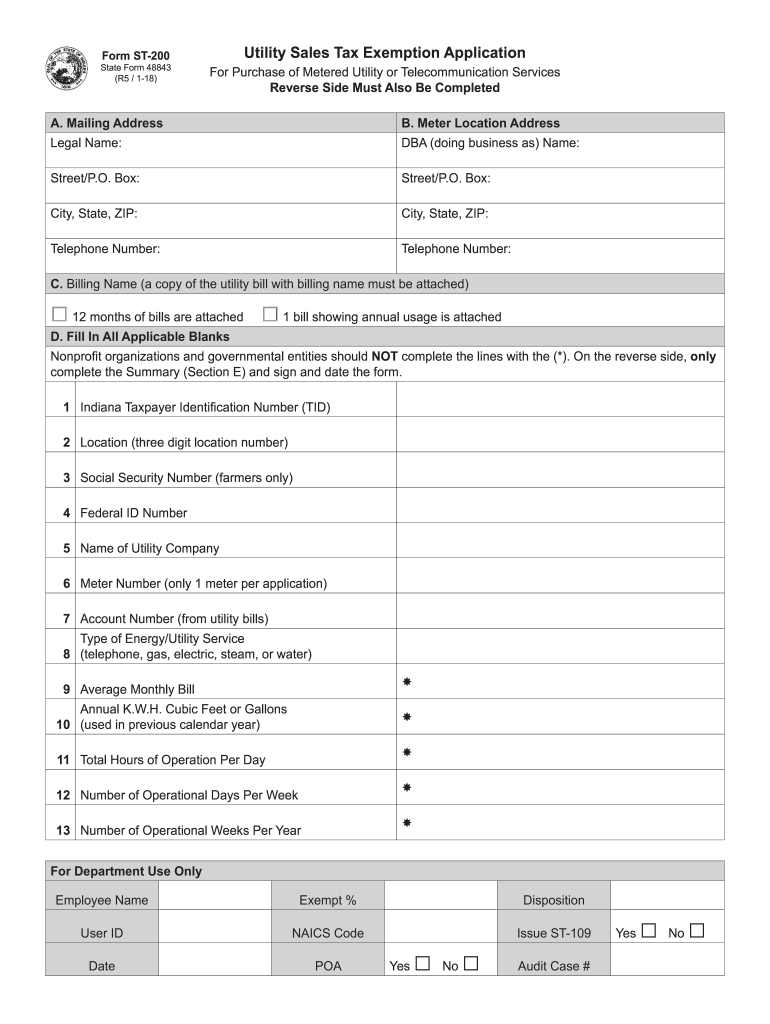
Location, meter number and account number must be attached. If this information isn t available on the bill other documentation will need to be provided. For example, a screen shot of your online utility account or something from the utility company on their letterhead with the information needed. Annual utility usages must be documented. Attach either 12 months of billings or one month that has the annual usage documented, typically in a usage graph. Section D: Fill in All Applicable Blanks:.
Loading

Open form follow the instructions

Easily sign the form with your finger

Send filled & signed form or save
How to use or fill out the IN DoR ST-200 online
Filling out the IN DoR ST-200 form online can streamline the process of applying for utility sales tax exemption for metered utility or telecommunication services. This guide provides step-by-step instructions to ensure a smooth and efficient application experience.
Follow the steps to complete your IN DoR ST-200 form online:
- Click ‘Get Form’ button to access the form and open it in your preferred editor.
- In section A, provide your mailing address using the legal name of your business entity along with a complete utility bill to facilitate the application review.
- Proceed to section B and enter the meter location address where the utility service is provided.
- In section C, indicate the billing name and attach a complete copy of the utility bill, ensuring it displays the billing name, location, meter number, and account number.
- For section D, fill in all applicable blanks with the required information. Note that qualified nonprofit organizations and governmental entities should skip fields marked with an asterisk (*).
- In section E, provide a summary detailing how the utility service is used, ensuring that the explanation is thorough and covers all aspects.
- For sections F and G, if applicable, complete the utility usage study by listing all relevant equipment, explaining its use, providing power ratings, and detailing energy consumption for the past year.
- Finally, complete section H by signing and dating the application. If you are a representative, remember to attach Form POA1.
- After filling out all sections, review the form for completeness. You can then save changes, download, print, or share the completed application.
Start your form-filling process online to take advantage of tax exemptions!
Experience a faster way to fill out and sign forms on the web. Access the most extensive library of templates available.
Related content
Form ST-200 is for metered utility or telecommunication services. It verifies exempt...
The inventor and developer of the ST200 digital microfilm imaging system, he installed his...
O e-SUS AB é uma estratégia do Departamento de Atenção Básica (DAB) para reestruturar...
Get answers to your most pressing questions about US Legal Forms API.
How do I fill out a federal tax exemption?
Filling out a federal tax exemption involves gathering required information and completing the appropriate IRS forms. This includes detailing your organization's mission and purpose, which supports your application for exemption. Be thorough in your descriptions, as the IRS considers these details carefully. Utilizing platforms like UsLegalForms can streamline the process of achieving your exemption under the IN DoR ST-200.
How to answer 'Are you tax-exempt?'
When asked if you are tax-exempt, respond with a clear 'yes' or 'no' based on your status. If yes, be prepared to provide documentation to support your claim, such as your tax exemption certificate. This may include referencing your eligibility under laws linked to the IN DoR ST-200. Transparency in your response can help establish trust.
How to fill out a withholding allowance form?
Filling out a withholding allowance form begins with providing your personal details, such as your name and address. You need to calculate the number of allowances based on your tax situation, which influences your withholding amount. Always double-check to make sure your calculations are correct. Leveraging resources like UsLegalForms can help you navigate filling out this form accurately.
How to fill out an Employee Withholding Exemption Certificate?
To fill out an Employee Withholding Exemption Certificate, start by entering your personal information, including your name and Social Security number. Indicate the number of allowances you claim, as this will affect your withholding tax. Furthermore, if you qualify for an exemption, clearly state the reason. Using tools from UsLegalForms can simplify this process for you.
Is your EIN number the same as your tax-exempt number?
Your Employer Identification Number (EIN) and tax-exempt number are not the same. The EIN is a unique identifier assigned to your business by the IRS, while the tax-exempt number indicates your tax-exempt status. Understanding the distinction is important for compliance with tax laws. If you are seeking tax-exempt status, make sure to reference the IN DoR ST-200 during your application.
How do you fill a ST120?
Filling out a ST120 form involves detailing your business information, including your name, address, and account number. You'll also list the types of purchases that are tax-exempt under the law. It is essential to follow specific instructions provided for the form to ensure compliance. Using platforms like UsLegalForms can guide you through the ST120 process.
How do I fill out a tax exemption certificate?
Filling out a tax exemption certificate requires you to provide specific information about your business or organization. Begin by entering your name, address, and the reason for the exemption. Ensure that you supply your federal tax identification number, if applicable. Additionally, keep in mind that each state may have different requirements for their forms, including the IN DoR ST-200.
Does Indiana accept out of state tax exemption certificates?
Indiana may accept out-of-state tax exemption certificates, but adherence to specific regulations is essential. The IN DoR ST-200 outlines the necessary criteria for acceptance, ensuring that the certificates meet Indiana's standards. Always check the validity of such certificates to remain compliant with state laws.
Do Indiana tax exempt forms expire?
Yes, Indiana tax exempt forms can expire. Generally, businesses should review their tax exempt status regularly to ensure compliance with the IN DoR ST-200 guidelines. Keeping track of expiration dates helps avoid unnecessary sales tax on exempt purchases. Consider using platforms like uslegalforms for up-to-date information on managing these forms.
Does Indiana take out state taxes?
Indiana does not typically take out-of-state taxes unless the transaction involves taxable goods shipped to Indiana. For any purchases made from out-of-state vendors, local sales tax regulations may apply. To navigate these requirements effectively, consult resources related to the IN DoR ST-200, or explore the offerings on the uslegalforms platform.
Use professional pre-built templates to fill in and sign documents online faster. Get access to thousands of forms.
If you believe that this page should be taken down, please follow our DMCA take down process here.
This form is available in several versions. Select the version you need from the drop-down list below.